Материал: grid
An Easy Reference for ALV Grid Control
PROP_ID
: Assign a constant attribute of the class
CL_ALV_GRAPHICS_CU
with prefix
CO_PROPID_
to this field to
determine the changes to be made to the graphic. Use the
CL_ALV_GRAPHICS_CU=>CO_PROPID_TITLE
attribute, for
example, to refer to the title of the diagram.
PROP_VAL
: The value of the relevant topic, for example, 'My Title'.
IT_OUTTAB
Output table with the data to be displayed
IT_FIELDCATALOG
Determines the structure of the output table and the format of the
data to be displayed
IT_SORT
Table with sort properties for columns that are to be sorted
initially
IT_FILTER
Table with filter properties for columns for which a filter is to be
set initially
Table 1 –
Interface of the method “set_table_for_first_display”
The second method we used in our code snippet was “
refresh_table_display
” which, as
implied from the name again, is used to refresh the ALV display. We do not want our ALV Grid to be
created every time the PBO triggers. The first pass should create it and others should just refresh.
However, we may require some changes about the appearance, layout, field catalog etc…. In that case,
we will try to use other ALV methods to make changes. The parameter definition table of this method is as
follows.
Parameter Meaning
IS_STABLE
If the row or column field of this structure is set, the position of
the scroll bar for the rows or columns remains stable.
I_SOFT_REFRESH
This parameter is used only in exceptional cases. If you set this
parameter, any totals created, any sort order defined and any filters
set for the data displayed remain unchanged when the grid control
is refreshed. This makes sense, for example, if you have not
modified the data of the data table and want to refresh the grid
control only with regard to layout or field catalog changes.
Table 2 –
Interface of the method “
refresh_table_display
”
OK! Seeing a simple but whole picture we are now ready to advance to build our basic components
which we just point as form calls in the scheme.
© 2005 SAP AG
11
An Easy Reference for ALV Grid Control
Building Field Catalog
As mentioned earlier, there are three procedures to build a field catalog. The simplest way applies if
our list structure is similar to a dictionary table. To do this, we simply eliminate the form call and pass the
name of dictionary structure (in our example, ‘
SFLIGHT
’) to the parameter ‘
I_STRUCTURE_NAME
’. Before
explaining other procedures, let’s see what a field catalog has in its structure.
Structure Of A Field Catalog
The row structure of a field catalog is of dictionary type ‘
LVC_S_FCAT
’. There are many fields providing
adjustment of display options for our list columns. Here are the basic ones.
FIELDNAME
You use this field to assign a field name of your output table
to a row of the field catalog. All settings that you make in this row
refer to the corresponding column of the output table.
REF_FIELD
You must fill this field if:
the output table field described by the current entry in the field
catalog has a corresponding field in the Data Dictionary and
the field name in the output table is not identical to the field name
of the field in the Data Dictionary.
If the field names are identical, it is sufficient to specify the
DDIC structure or table in field
REF_TABLE
of the field
catalog.
REF_TABLE
You must fill this field only if the output table field described by
the current entry in the field catalog has a corresponding entry in
the Data Dictionary. Using this assignment, the ALV Grid
Control can copy the text for the column header from the
Dictionary, for example.
CHECKBOX
Outputting a checkbox. The checkbox cannot be modified by the
user.
COL_POS
Relevant only if the relative column positions should not be
identical to the sequence of fields in the field catalog when the
list is displayed for the first time. The parameter determines the
relative column position of the field for list output. The user can
interactively modify the order of the columns. If this parameter
is initial for each field catalog entry, the order of the columns
corresponds to the sequence of fields in the field catalog.
DO_SUM
If this field is set, the ALV uses this field to calculate the total (this
corresponds to the generic totals function in the toolbar.)
EMPHASIZE
If the field is set to 'X', the ALV uses a pre-defined color for
highlighting the column. If it is set to 'Cxyz' (color code), the
remaining numbers have the following meaning:
x: color number
y: intensified display on/off
z: inverse display on/off
© 2005 SAP AG
12
An Easy Reference for ALV Grid Control
HOTSPOT
If this field is set, all cells of this column are hotspot-sensitive.
HREF_HNDL
Handle to which an URL is assigned. The ALV Grid Control
displays all cells of the column as hyperlinks. You must
maintain the target address of the hyperlink in a table of type
LVC_T_HYPE
and pass it using set_table_for_first_display.
KEY
If this field is set, the ALV Grid Control color-codes the column as
a key field and fixes this column during horizontal scrolling. The
order of the key columns in the ALV Grid Control can be modified
interactively. In contrast to the SAP List Viewer, the ALV Grid
Control allows you to directly hide key columns with
NO_OUT
LOWERCASE
If this field is set, the ALV Grid Control recognizes upper/lower
case in the output table. This affects the sorting of fields, for
example.
NO_OUT
If you set this field, you hide the relevant column in the list.
Nevertheless, the column is available in the field selection and
can be interactively selected by the user as a display field. The
ALV displays the contents of hidden fields on the detail screen
for a row in the grid control.
NO_MERGING
If this field is set, cells with the same value are not merged into
a single cell when this column is sorted.
NO_SUM
If you set this field, you lock totals calculation for the relevant field.
OUTPUTLEN
Determines the column width of the field:
If the field has a reference to the Data Dictionary, you can leave
the field set to its initial value. In this case, the ALV adopts the
output length of the relevant domain.
For fields without reference to the DDIC, you must specify the
desired field output length.
STYLE
Displays all cells of this column with a style e.g. as pushbuttons.
Constants “MC_STYLE…” of the class
“
cl_gui_alv_grid
” can be passed to this field.
TECH
If this field is set, the relevant field is not displayed on the list
and cannot be shown interactively. The field is only known in
the field catalog. (For example, it must not be specified as a
sorting criterion).
DECIMALS_O
If a field has no currency, then you can use this field to
determine the number of decimal places to be displayed. This
setting is kept even if you afterwards assign a currency field to
this field or assign a currency to the
CURRENCY
field of the
field catalog.
DECMFIELD
Defining the digits after the comma on a row-by-row basis. You
can use an additional field in the output table to determine how
many digits are to be displayed after the comma in each row.
© 2005 SAP AG
13
An Easy Reference for ALV Grid Control
EDIT_MASK
If you set a conversion exit (for example, conv = '
==ALPHA
' for
function module
CONVERSION_EXIT_ALPHA_OUTPUT
), you
enforce output conversion for the associated output field.
ICON
If this field is set, the column contents of the output table are
output as an icon. The column contents must consist of valid icon
strings (
@xx@
or
@xx\Q
<Quickinfo>
@
). You should consider
the problem of printing icons.
JUST
Relevant only to fields of data type
CHAR
or
NUMC
.
Justifications:
'R': right justified
'L': left justified
'C': centered
How the column header is justified, depends on how the column
contents are justified. You cannot justify the column header
separately.
LZERO
Relevant only to fields of data type
NUMC
. In the default
setting, the ALV Grid Control displays these fields right
justified without leading zeros. If you set
LZERO
, leading
zeros are displayed.
NO_SIGN
Relevant only to value fields. If you set
NO-SIGN
, values are
displayed without signs.
NO_ZERO
If
NO_ZERO
is set, no zeros are displayed for initial value
fields. The cell remains empty.
COLDDICTXT
Relevant only to fields with reference to the Data Dictionary.
You use values 'L', 'M', 'S' or 'R' to determine if
SCRTEXT_L
,
SCRTEXT_M,
SCRTEXT_S
or
REPTEXT
is used as the
column header.
COLTEXT
Determines the column header of the column. You should
assign a value to this field if it does not have a Data Dictionary
reference.
REPTEXT
Relevant only to fields with reference to the Data Dictionary.
For such fields, the ALV Grid Control copies the field label for
the header of the corresponding data element into this field.
SCRTEXT_L
Relevant only to fields with reference to the Data Dictionary. For
such fields, the ALV Grid Control copies the
long
field label of the
corresponding data element into this field.
SCRTEXT_M
Relevant only to fields with reference to the Data Dictionary. For
such fields, the ALV Grid Control copies the
medium
field label of
the corresponding data element into this field.
SCRTEXT_S
Relevant only to fields with reference to the Data Dictionary.
For such fields, the ALV Grid Control copies the
short
field
label of the corresponding data element into this field.
SELDDICTXT
Relevant only to fields with reference to the Data Dictionary.
You use values 'L', 'M', 'S' or 'R' to determine if
SCRTEXT_L
,
© 2005 SAP AG
14
An Easy Reference for ALV Grid Control
SCRTEXT_M
,
SCRTEXT_S
or
REPTEXT
is used as the text
for column selection.
SELTEXT
Determines the text to be used in the column selection for the
column. You should assign a value to this field if it does not
have a Data Dictionary reference.
TIPDDICTXT
Relevant only to fields with reference to the Data Dictionary.
You use values 'L', 'M', 'S' or 'R' to determine if
SCRTEXT_L
,
SCRTEXT_M
,
SCRTEXT_S
or
REPTEXT
is used as the tool
tip.
TOOLTIP
Determines the text to be used as the tool tip for the column.
You should assign a value to this field if it does not have a Data
Dictionary reference.
INTTYPE
ABAP data type
SP_GROUP
You use the group key (char(4)) to group several fields together.
On the dialog box for defining a layout, the user can then limit
the list of hidden columns to this group.
Table 3 –
Field Catalog Fields
Building Field Catalog Manually
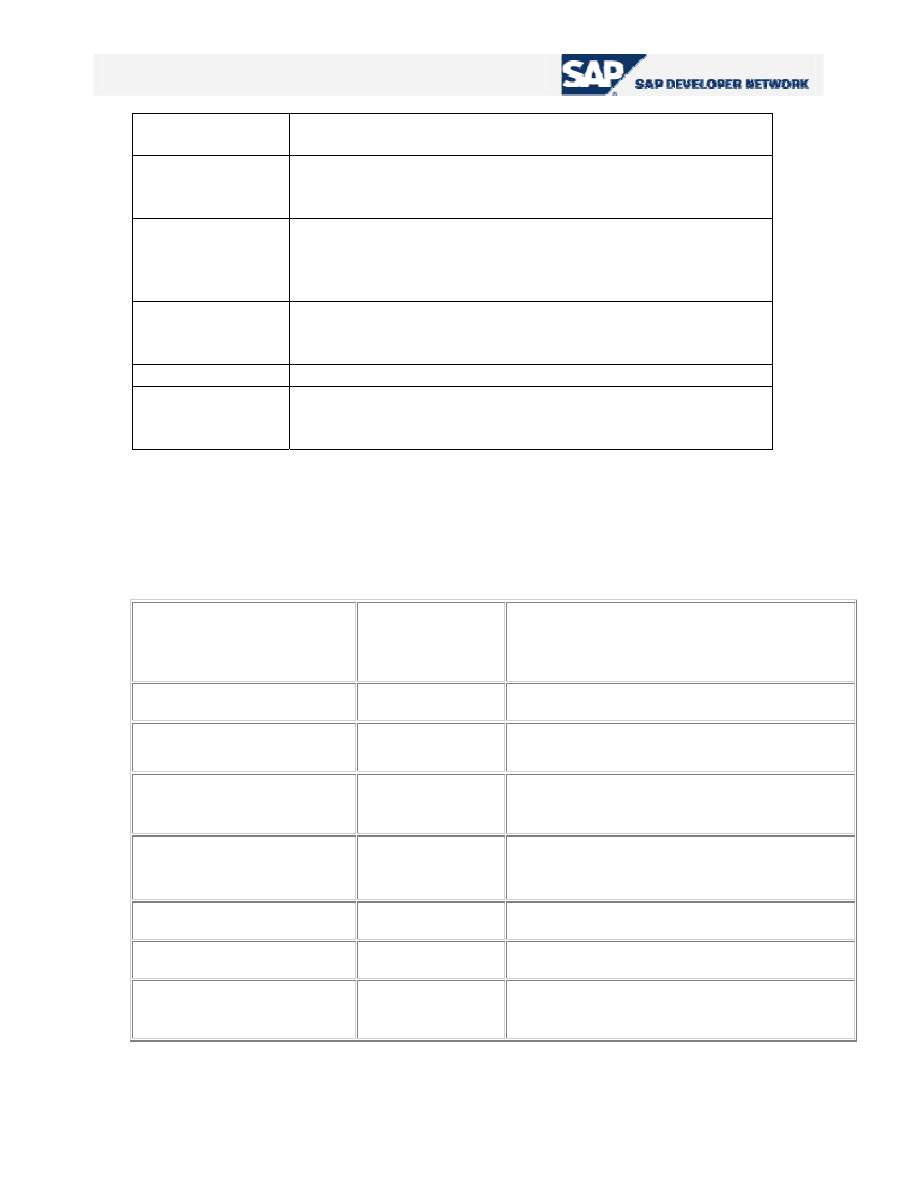
The work in this procedure is just filling the internal table for the field catalog. We have seen the
structure of a field catalog above. To achieve filling the field catalog correctly, one must at least fill the
following fields of the field catalog structure for each column of the list:
Output table fields with
DDIC reference
Output table
fields without
DDIC reference
Explanation
FIELDNAME
FIELDNAME
Name of the field of the internal output table
REF_TABLE
Name of the DDIC reference structure
REF_FIELD
Name of the DDIC reference field (only
needed if other than
FIELDNAME
)
INTTYPE
ABAP data type of the field of the internal
output table
OUTPUTLEN
Column width
COLTEXT
Column header
SELTEXT
Column description in column selection for
layout
Table 4 –
Mandatory fields to be filled to build the field catalog manually
© 2005 SAP AG
15