Материал: Цели и задачи обучения английскому языку для специальных целей
Целью обучения английскому языку для специальных целей в системе СПО является: формирование языковой, речевой и социокультурной компетенций; овладение обучающимися элементами непосредственного и навыками опосредованного общения на английском языке для последующего использования и совершенствования сформированных в процессе обучения общих компетенций в бытовой, профессиональной и академической деятельности.
Изучение английского языка также призвано обеспечить:
повышение уровня учебной автономии у обучающихся, способности к самообразованию;
развитие творческих способностей;
развитие информационной культуры;
повышение общей культуры студентов;
воспитание толерантности и уважения к разным странам и народностям.
Цель занятий: совершенствование умений профессионально ориентированного устного и письменного общения по заданной теме.
Задачи занятий:
- совершенствование умений просмотрового и поискового чтения текстов, профессионально ориентированной тематики;
- совершенствование навыков перевода;
- совершенствование умений оформления устного и письменного сообщения по заданной теме;
- совершенствование умений обработки информации с при помощи информационно-коммуникативных технологии;
- совершенствование когнитивных умений анализировать, обобщать информацию, делать выводы;
- совершенствование мотивационной составляющей для изучения английского языка у студентов за счёт использования информации, касающейся сферы их профессиональных интересов, с учётом междисциплинарных связей.
Information Technology – a Definition:
Read. Write down and translate the marked words.
We use the term information technology or IT to refer to an entire industry. In actuality, information technology is the use of computers and software to manage information. In some companies, this is referred to as Management Information Services (or MIS) or simply as Information Services (or IS). The information technology department of a large company would be responsible for storing information, protecting information, processing the information, transmitting the information as necessary, and later retrieving information as necessary.
History of Information Technology:
In relative terms, it wasn't long ago that the Information Technology department might have consisted of a single Computer Operator, who might be storing data on magnetic tape, and then putting it in a box down in the basement somewhere. The history of information technology is fascinating! Check out these history of information technology resources for information on everything from the history of IT to electronics inventions and even the top 10 IT bugs.
Modern Information Technology Departments:
In order to perform the complex functions required of information technology departments today, the modern Information Technology Department would use computers, servers, database management systems, and cryptography. The department would be made up of several System Administrators, Database Administrators and at least one Information Technology Manager. The group usually reports to the Chief Information Officer (CIO).
Write down and translate the skills. Popular Information Technology Skills:
Some of the most popular information technology skills at the moment are:
Computer Networking
Information Security
IT Governance
ITIL
Business Intelligence
Linux
Unix
Project Management
Jobs in it:
There can be a lot of overlap between many of the job descriptions within information technology departments. In order to clarify the descriptions, skills and career paths of each, I have put together a Jobs in IT listing. The jobs in IT listing includes information on education and training required for each position. It also includes lists of companies that typically have IT jobs open, as well as links to IT-specific resumes, cover letters and IT interview questions.
http://jobsearchtech.about.com/od/careersintechnology
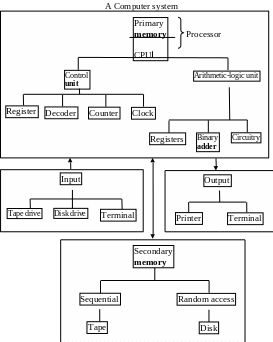
Exercise. Using the diagram, complete the paragraph below.
A computer, has four basic components: input, processor, storage and output. The CPU consists of two parts: the 1________, which directs and controls the signals and commands inside the processor, and the 2________ unit, which does the arithmetic operations and the decision-making operations. While the 3________ is made up of a 4________, a 5________, a 6________, and a 7________, the 8________ is composed of 9________, a 10________, and 11________.
In a computer, internal memory or 12________ refers to the storage locations inside the computer, whereas 13________ refers to the storage embodied in the peripherals. 14___________ may be divided into 15________ ( 16________ ) and 17________ ( 18________ ).
The 19________ devices can be either a 20________, a 21________, or a 22________.These devices enter information into the computer. After the processor has operated on it, the 23__________ devices display the results of the computations on either a 24________ or a 25________, or store them on tape or disk for future use.
Oxford English for Computing
How Cloud Computing And Mobile Tech Is Changing Our Daily Lives.
Read. Write down and translate the marked words.
In today's world our computers have become an inseparable part of our daily lives. We take them with us everywhere we go in one form or another. This constant availability to technology has created an environment where we are always connected to the important data of our lives. One of the major advantages of having technology at our finger-tips is that we always have access to our favorite movies, photos, music and more. When traveling, we never have to be without important documents, out of touch with friends and family members, or be without the latest news and current events. Of course, with all this connectivity we also need tools and services to keep everything straight and easy to use. One of the most important developments in that regard has been the "cloud". Cloud computing is a term that is used to refer to the storage of information on internet based servers rather than local storage devices. A person can access data from any connected device that has been given permission to do so and, if needed, has the right software installed. Some services and functions require you to install specialized programs, while others simply are used through portals accessible from your internet browser. Some of the more popular cloud-based services are photo and music sharing sites. These services allow you to back up your photos and share them with others, with only a few clicks of the mouse. It is no longer necessary to "zip" photo files, use complicated compression formats, or wait for pictures to be printed out and mailed to loved ones. Uploading files and giving permissions to your friends and family is an easy task that will allow them to view your latest pictures from their systems. Another very active component of cloud computing is the virtual office. Services such as Google apps, allow you to keep all of your office suite applications available anytime you need them, from any connected device. You can do just about anything with one of these services that you could do with desktop-based software, such as write documents, work with spreadsheets and even create slide show presentations. These systems are also tied to social networking and the cyber-life trend that is becoming popular. These social networking services take advantage of the power of the cloud to make sharing, connecting and experiencing information much easier than ever before. Adding a computing system that is specifically designed to be versatile and flexibility is the logical evolution of the hyper-connected, everywhere tech life that we have developed in our modern society. These are only the first stages of the ever expanding technological demands that are being addressed by developers and programmers. As new demands are placed on systems, they will continue to evolve to meet the needs of consumers.
http://service.ezinemark.com/how-cloud-computing-and-mobile-tech-is-changing-our-daily-lives-32273fa6057.html
The most widely accepted definition of the computer includes the following operations:
Input. A computer accepts data that is provided by means of an input device such as a keyboard.
Processing. A computer performs operations on the data to transform it in some way.
Output. A computer produces output on a device, such as a printer or monitor, that shows the results of processing operations.
Storage. A computer stores the results of processing operations for future use.
This definition is often referred to as the IPOS cycle. The four steps of the IPOS cycle input, processing, output storage - don't have to occur in a rigid I- P-O-S sequence. Under the direction of a program, a computer uses the steps of this process when needed and as often as needed.
Exercises.
Write the translations.
GUI, window, icon, pointer, menu, interface, dialog box, textbook, checkbox, title bar, tab, recycle bin, arrow pointer.
2. Give the Russian equivalents:
to centre attention on; to the right; to the left; a set of figures; and so on; a sequence of reasonable operations; to put out answers; to take in information; to store information; such as; to express mathematical and logical relations; by using physical analogs; numerical measurements.
3. Make definitions by adding to the statements (1-10).
|
|
|
|
|
|
|
|
|
|
What is Hardware?
Read. Write down and translate the marked words, find all hardware components.
Your PC (Personal Computer) is a system, consisting of many components. Some of those components, like Windows XP, and all your other programs, are software. The stuff you can actually see and touch, and would likely break if you threw it out a fifth-story window, is hardware. Not everybody has exactly the same hardware. But those of you who have a desktop system, like the example shown in Figure 1, probably have most of the components shown in that same figure. Those of you with notebook computers probably have most of the same components. Only in your case the components are all integrated into a single book-sized portable unit.
The system unit is the actual computer; everything else is called a peripheral device. Your computer's system unit probably has at least one floppy disk drive, and one CD or DVD drive, into which you can insert floppy disks and CDs. There's another disk drive, called the hard disk inside the system unit, as shown in Figure 2. You can't remove that disk, or even see it. But it's there. And everything that's currently "in your computer" is actually stored on that hard disk. (We know this because there is no place else inside the computer where you can store information!).
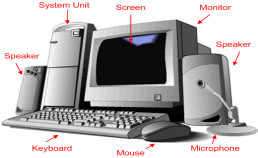
Figure 1
The floppy drive and CD drive are often referred to as drives with removable media or removable drives for short, because you can remove whatever disk is currently in the drive, and replace it with another. Your computer's hard disk can store as much information as tens of thousands of floppy disks which are running out of space very soon. That’s why, now we practically don’t use floppy disks and CDs. You may store everything you create or download on your USB. We use it to send copies of files through the mail, or to make backup copies of important items.
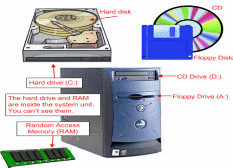
Figure 2