Материал: m013202e
5.2ID Code for WAGO I/O System
Due to the combined use of digital, analog and special functions on one fieldbus station and with the given structure of the Interbus ID codes, it is impossible to manage with one ID code.
The WAGO Interbus S buscoupler is identified as a digital slave with variable length!
|
ID-Code |
|
Digital |
|
Digital |
Analog |
Analog |
|
|
dec, hex |
|
Outputs |
|
Inputs |
Outputs |
Inputs |
|
|
1, |
0x1 |
|
x |
|
|
|
|
|
2, |
0x2 |
|
|
|
x |
|
|
|
3, |
0x3 |
|
x |
|
x |
|
|
|
49, 0x31 |
|
- |
|
|
x |
|
|
|
50, 0x32 |
|
|
|
- |
|
x |
|
|
51, 0x33 |
|
- |
|
- |
x |
x |
|
[x]: ID code given |
[]: is not possible |
[-]: when mixed with digital |
|
|||||
Table 3: ID codes for the WAGO Interbus S buscoupler
For the master, it is important to know how many data registers each user assigns in the Interbus S system. If a user has, for example, 16 bits of input and 32 bits of output, he assigns 2 words in the bus because there are 2 words of output. In this case the higher value of data width is decisive. The data width is coded by the bits ID 8 to ID 12 as shown in section 5.1.
The following table shows the register widths depending on the function modules connected to a WAGO Interbus S buscoupler.
Possible values for data length are::
Data length |
Buscoupler |
Remarks |
|
0 Words |
x |
|
|
1 |
Nibble |
|
Busmaster supports only Generation 4. |
1 |
Byte |
|
Starting with SPS-Firmware 3.20 or PC-driver 2.0 |
3 |
Nibble |
|
Busmaster supports only Generation 4 |
1 Word |
x |
|
|
3 |
Nibble |
|
Busmaster supports only Generation 4 |
3 |
Byte |
|
Starting with SPS-Firmware 3.20 or PC-driver 2.0 |
2 Words |
x |
|
|
5 |
Nibble |
|
Busmaster supports only Generation 4 |
5 |
Byte |
|
Starting with SPS-Firmware 3.20 or PC-driver 2.0 |
3 Words |
x |
|
|
4 Words |
x |
|
|
5 Words |
x |
|
|
6 |
Words |
x, ab WF |
Starting with SPS-Firmware 3.20 or PC-driver 2.0 |
7 |
Words |
x, ab WF |
Starting with SPS-Firmware 3.20 or PC-driver 2.0 |
8 Words |
x |
|
|
9 Words |
x |
|
|
10 Words |
xx |
Starting with SPS-Firmware 3.20 or PC-driver 2.0 |
|
12 Words |
xx |
Starting with SPS-Firmware 3.20 or PC-driver 2.0 |
|
14 Words |
xx |
Starting with SPS-Firmware 3.20 or PC-driver 2.0 |
|
16 Words |
xx |
Starting with SPS-Firmware 3.20 or PC-driver 2.0 |
|
24 Words |
xx |
Starting with SPS-Firmware 3.20 or PC-driver 2.0 |
|
32 Words |
xx |
Starting with SPS-Firmware 3.20 or PC-driver 2.0 |
|
[x]: is used [xx]: is used and firmware 3.20 or PC driver 2.0 or later is combined
INTERBUS S / Configuration |
14 |
:$*2Ç, 2Ç6<67(0
5.3 IBS CMD configuration software
In the following chapter the configuration package IBS CMD configuration software is presented in short form. This procedure facilitates operation of the WAGO Interbus buscoupler.
Further and specific information is given in the respective operating instructions of the different software packages.
5.3.1 CMD Software Package
Please pay attention that the corresponding interfacing and the function extended should be selected.
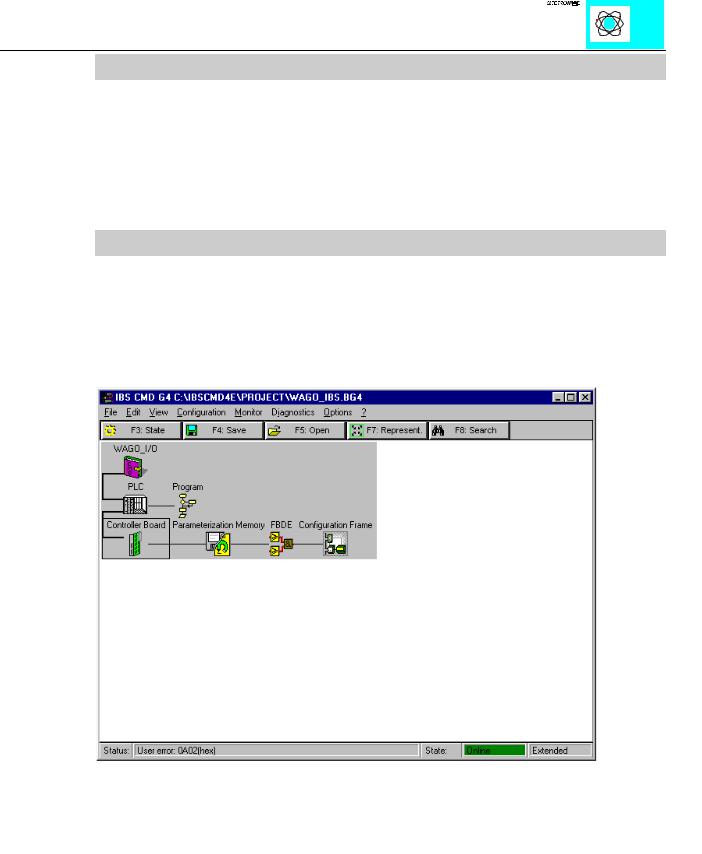
The following menu is obtained via the key OK and the password allocated at the program installation.
Ill. 10: First menu configuration
This is the first menu for further configuration. From this point the configuration can be made automatically or manually.
INTERBUS S / Configuration |
15 |
:$*2Ç, 2Ç6<67(0
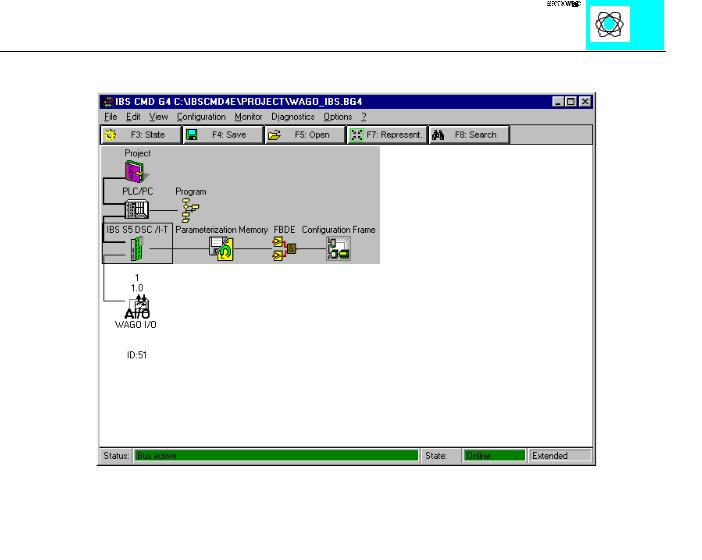
1) Automatic configuration
Ill. 11: Automatic configuration
If the complete fieldbus system with all stations and the master interface is operational, automatic configuration of the connected stations can be called up via the menu „bus structure“. Then the communications are started automatically and the configuration is determined and set.
INTERBUS S / Configuration |
16 |
:$*2Ç, 2Ç6<67(0
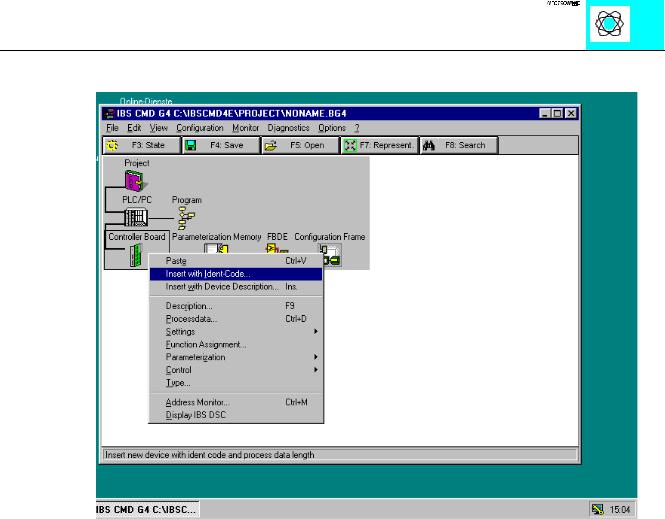
2) Ident code
Ill. 12: Insertion of the WAGO I/O System via the Ident code
For manual configuration, the menu item „bus structure“ in the configuration screen must be selected. You will then see Ill. 12.
The corresponding ID code of table 3 and the length of the process data channel must be indicated in the selected submenu. The length is dependent on the module with the largest data length.
INTERBUS S / Configuration |
17 |
:$*2Ç, 2Ç6<67(0
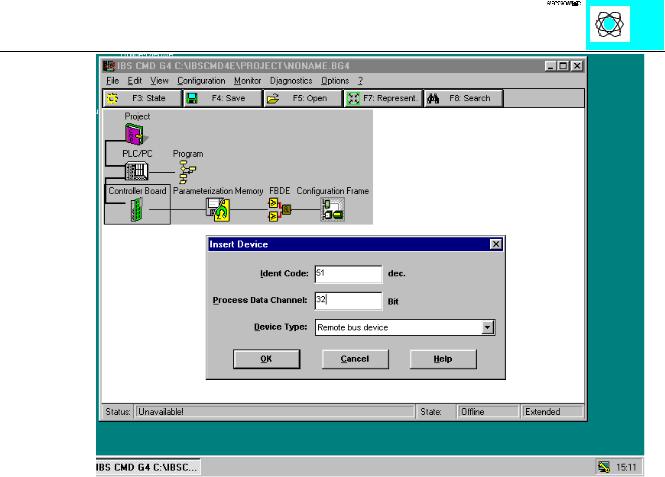
Ill. 13: Insertion of the ID code and the data length
With the finalization of the entries via the key OK, a menu for the definition of the user will appear.
INTERBUS S / Configuration |
18 |
:$*2Ç, 2Ç6<67(0