Материал: part17

Внимание! Если размещение файла нарушает Ваши авторские права, то обязательно сообщите нам

DICOM PS3.17 2020a - Explanatory Information​

Page 541​

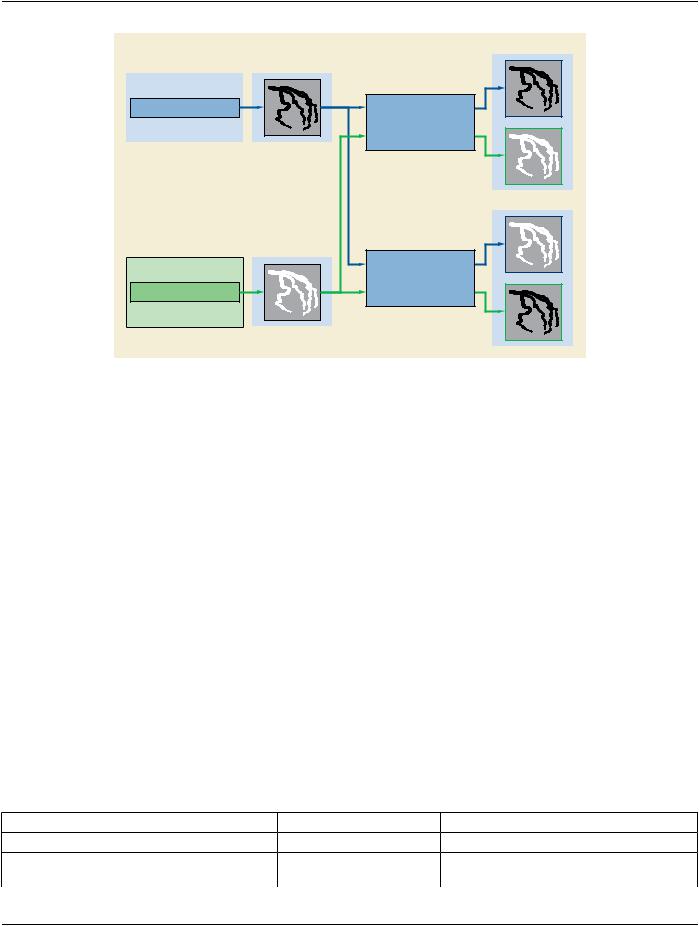
System A

Stored Pixel Data

Pixel Intensity Relationship Sign

Photometric Interpretation

(0028,1041) = 1

(0028,0004) = MONOCHROME2


Presentation LUT Shape


(2050,0020) = IDENTITY

System B

Stored Pixel Data

Photometric Interpretation

(0028,0004) = MONOCHROME1

Pixel Intensity Relationship Sign

Presentation LUT Shape

(0028,1041) = -1

(2050,0020) = INVERSE

Displayed Pixels

Displayed Pixels

Figure FFF.2.3-1. Example of usage of Photometric Interpretation​

FFF.2.3.2 Mask Subtraction​

This section provides information on the usage of Attributes to encode an image acquisition in subtracted display mode.​

FFF.2.3.2.1 User Scenario​

A straightforward DSA acquisition is performed. The first few frames do not contain contrast, then the rest of frames contain contrast.​ An "averaged mask" may be selected to average some of the first frames without contrast.​

A peripheral stepping DSA acquisition is performed. The acquisition is running in N steps and is timed to perform a mask run (e.g.,​ from feet to abdomen) and then perform contrast runs at the positions of each mask, as triggered by the user.​

One or more ranges of contrast frames will be used for subtraction from the mask for loop display. During the display, some ranges​ are to be fully subtracted, some others may be partially subtracted allowing a certain degree of visibility of the anatomical background​ visible on the mask, and finally some ranges are to be displayed un-subtracted.​

FFF.2.3.2.2 Encoding Outline​

The Enhanced XA SOP Class allows the encoding of the mask Attributes similar to what the XA SOP Class provides.​

The Enhanced XA SOP Class allows defining of specific display settings to be applied to a subset of frames, for instance the recom-​ mended viewing mode and the degree of visibility of the mask.​

FFF.2.3.2.3 Encoding Details​

This section provides detailed recommendations of the key Attributes to address this particular scenario.​

Table FFF.2.3-4. Enhanced X-Ray Angiographic Image IOD Modules​

IE​

Module​

PS3.3 Reference​

Usage​

Image​

Mask​

C.7.6.10​

Specifies the subtraction parameters.​


XA/XRF Multi-frame Presentation​C.8.19.7​

Specifies display settings of the groups of​


frames.​

- Standard -​

Page 542​

DICOM PS3.17 2020a - Explanatory Information​

FFF.2.3.2.3.1 Mask Module Recommendations​

Thismoduleisusedtospecifythesubtractionparameters.ThenumberofItemsdependsonthenumberofSubtractionstobeencoded.​ Typically, in case of AVG_SUB, the number of Items is at least the number of ranges of contrast frames to be subtracted from a dif-​ ferent mask.​

Table FFF.2.3-5. Mask Module Recommendations​

Attribute Name​

Tag​

Comment​

Recommended Viewing Mode​

(0028,1090)​ Recommended in this scenario, a value of "SUB" is used in this case.​

Mask Subtraction Sequence​

(0028,6100)​ Recommended in this scenario. Items can be used to specify:​

•​Arangeofcontrastframesistobesubtractedfromageneratedmask;​

•​Adifferentsetofpixel-shiftpairsistobeappliedtoarangeofcontrast​ frames.​

FFF.2.3.2.3.2 XA/XRF Multi-frame Presentation Module Recommendations​

TheframerangesofthismoduletypicallyincludeallthemasksandcontrastframesdefinedintheMaskModule,andtheirpresentation​ settings are consistent with the Mask Module definitions.​

The mask frames are typically displayed non-subtracted, i.e., Recommended Viewing Mode (0028,1090) equals NAT.​

If there is a frame range without mask association, the value "NAT" is used for Recommended Viewing Mode (0028,1090) in the item​ of the Frame Display Sequence (0008,9458) of that frame range.​

In case where Recommended Viewing Mode (0028,1090) equals "NAT", the display is expected to be un-subtracted even if the Re-​ commended Viewing Mode (0028,1090) of the Mask module equals "SUB".​

FFF.2.3.2.4 Examples​

The user performs an X-Ray acquisition in three steps:​

•​First step of 5 frames for mask acquisition, without contrast agent injection;​

•​Second step of 20 frames to assess the arterial phase, with contrast agent injection, to be subtracted to the average of the 5 mask​ frames acquired in the first phase;​

•​Third step of 10 frames to assess the venous phase, without further contrast agent injection, to be subtracted to a new mask related​ to that phase and with a 20% of mask visibility.​

In the three steps, the system automatically identifies the mask frame(s) to be associated with the contrast frames.​

The encoded values of the key Attributes of this example are shown in Figure FFF.2.3-2.​

- Standard -​

DICOM PS3.17 2020a - Explanatory Information​

Page 543​

Recommended Viewing Mode

(0028,6101)

= SUB

Mask Subtraction Sequence

(0028,6100)


Item 1


>Mask Operation

(0028,6101)

= AVG_SUB


>Subtraction Item ID

(0028,9416)

= 1


>Applicable Frame Range

(0028,6104)

= 27\35


>Mask Frame Numbers

(0028,6110)

= 26


>Mask Selection Mode

(0028,9454)

= SYSTEM


Item 2


>Mask Operation

(0028,6101)

= AVG_SUB


>Subtraction Item ID

(0028,9416)

= 1


>Applicable Frame Range

(0028,6104)

= 6\25


>Mask Frame Numbers

(0028,6110)

= 1\2\3\4\5


>Mask Selection Mode

(0028,9454)

= SYSTEM

...


Frame Display Sequence

(0008,9458)


Item 1


>Start Trim

(0008,2142)

= 1


>Stop Trim

(0008,2143)

= 5


>Skip Frame Range Flag

(0008,9460)

= DISPLAY


>Recommended Viewing Mode

(0028,1090)

= NAT


Item 2


>Start Trim

(0008,2142)

= 6


>Stop Trim

(0008,2143)

= 25


>Skip Frame Range Flag

(0008,9460)

= DISPLAY


>Recommended Viewing Mode

(0028,1090)

= SUB


>Mask Visibility Percentage

(0028,9478)

= 0


Item 3


>Start Trim

(0008,2142)

= 26


>Stop Trim

(0008,2143)

= 26


>Skip Frame Range Flag

(0008,9460)

= SKIP


>Recommended Viewing Mode

(0008,9459)

= NAT


Item 4


>Start Trim

(0008,2142)

= 27


>Stop Trim

(0008,2143)

= 35


>Skip Frame Range Flag

(0008,9460)

= DISPLAY


>Recommended Viewing Mode

(0028,1090)

= SUB


>Mask Visibility Percentage

(0028,9478)

= 20

Figure FFF.2.3-2. Attributes of Mask Subtraction and Display​

FFF.2.3.3 Pixel-shift​

This section provides information on the Attribute encoding for use with image acquisitions that require subtracted display modes with​ multiple pixel shift ranges e.g., multiple subtracted views on a DSA acquisition.​

FFF.2.3.3.1 User Scenario​

When performing DSA acquisitions, the acquisition system may choose a default subtraction pixel-shift to allow review of the whole​ multi-frame, as acquired.​

Withadvancedpost-processingfunctionthemedicalusermayaddfurthersubtractionpixel-shiftstocarveoutcertaindetailsorimprove​ contrast bolus visualization of a part of the anatomy that suffered from different movement during the acquisition.​

FFF.2.3.3.2 Encoding Outline​

The Mask Module is used to encode the various subtractions applicable to a Multi-frame Image.​

TheEnhancedXAIODallowscreatinggroupsofmask-contrastpairsintheMaskModule,eachgroupidentifiedbyauniqueSubtraction​ Item ID within the Multi-frame Image.​

The Enhanced XA IOD, with per frame macro encoding, supports multiple and different pixel-shift values per frame, each pixel-shift​ value is related to a given Subtraction Item ID.​

It has to be assured that all the frames in the scope of a Subtraction Item ID have the pixel-shift values defined under that Subtraction​

Item ID.​

- Standard -​

Page 544​

DICOM PS3.17 2020a - Explanatory Information​

In case a frame does not belong to any Subtraction Item ID, that frame does not necessarily have a pixel shift value encoded.​

FFF.2.3.3.3 Encoding Details​

This section provides detailed recommendations of the key Attributes to address this particular scenario. The usage of the "Frame​ Pixel Shift" macro in a 'per frame' context is recommended. Only the usage of Mask Module and the Frame Pixel Shift Macro is further​ detailed.​

Table FFF.2.3-6. Enhanced X-Ray Angiographic Image IOD Modules​

IE​

Module​

PS3.3 Reference​

Usage​

Image​

Mask​

C.7.6.10​

Specifies the groups of mask-contrast pairs identified​


by a Subtraction Item ID.​

Table FFF.2.3-7. Enhanced XA Image Functional Group Macros​

Functional Group Macro​

PS3.3 Reference​

Usage​

Frame Pixel Shift​

C.7.6.16.2.14​

Specifies the pixel shift associated with the​


Subtraction IDs.​

FFF.2.3.3.3.1 Mask Module Recommendations​

This module is recommended to specify the subtraction parameters. The number of Items depends on the number of Subtractions​ to be applied (see Section FFF.2.3.2).​

Table FFF.2.3-8. Mask Module Recommendations​

Attribute Name​

Tag​

Comment​

Recommended Viewing Mode​

(0028,1090)​ Recommended in this scenario, a value of "SUB" is used in this case.​

Mask Subtraction Sequence​

(0028,6100)​ Recommended in this scenario. Item can be used to specify:​

•​Arangeofcontrastframesistobesubtractedfromageneratedmask;​

•​Adifferentsetofpixel-shiftpairsistobeappliedtoarangeofcontrast​ frames.​

FFF.2.3.3.3.2 Frame Pixel Shift Macro Recommendations​

The usage in this scenario is on a "per frame" context to allow individual pixel shift factors for each Subtraction Item ID.​

The Subtraction Item ID specified in the Mask Subtraction Sequence (0028,6100) as well as in the Frame Pixel Shift Sequence​ (0028,9415) allows creating a relationship between the subtraction (mask and contrast frames) and a corresponding set of pixel shift​ values.​

The Pixel Shift specified for a given frame in the Frame Pixel Shift Macro is the shift to be applied when this frame is subtracted to​ its associated mask for the given Subtraction Item ID.​

NotallframesmayhavethesamenumberofItemsintheFramePixelShiftMacro,butallframesthatareinthescopeofaSubtraction​ Item ID and identified as "contrast" frames in the Mask module are recommended to have a Frame Pixel Shift Sequence item with​ the related Subtraction Item ID.​

Table FFF.2.3-9. Frame Pixel Shift Macro Recommendations​

Attribute Name​

Tag​

Comment​

Frame Pixel Shift Sequence​

(0008,9415)​

Recommended in this scenario. The number of Items may​


differ for each frame.​

- Standard -​

DICOM PS3.17 2020a - Explanatory Information​

Page 545​

FFF.2.3.3.4 Examples​

FFF.2.3.3.4.1 Usage of Pixel Shift Macro in Shared Context​

In this example, the pixel shift -0.3\2.0 is applied to the frames 2 and 3 when they are subtracted to the mask frame 1 as defined in​ the Mask Subtraction Sequence.​

Mask Subtraction Sequence

(0028,6100)


Item 1


>Mask Operation

(0028,6101)


= AVG_SUB


>Subtraction Item ID

(0028,9416)

= 100


>Applicable Frame Range

(0028,6102)

= 2\3


>Mask Frame Numbers

(0028,6110)

= 1


>Mask Operation Explanation

(0028,6190)


= Default Subtraction

Shared Functional Group Sequence

(5200,9229)


Item 1


All the frames


>Frame Pixel Shift Sequence

(0028,9415)


Item 1


>>Subtraction Item ID

(0028,9416)

= 100


>>Mask Sub-pixel Shift

(0028,6114)


= -0.3\2.0

Figure FFF.2.3-3. Example of Shared Frame Pixel Shift Macro​

FFF.2.3.3.4.2 Usage of Pixel Shift Macro in "per Frame" Context​

The usage in a per-frame context is expected in a typical clinical scenario where the shift between the mask and the contrast frames​ is not constant across the frames of the Multi-frame Image to compensate for patient/organ movement.​

The encoded values of the key Attributes of this example are shown in Figure FFF.2.3-4.​

Mask Subtraction Sequence

(0028,6100)


Item 1


>Mask Operation

(0028,6101)


= AVG_SUB


>Subtraction Item ID

(0028,9416)

= 100


>Applicable Frame Range

(0028,6102)

= 2\3


>Mask Frame Numbers

(0028,6110)

= 1


>Mask Selection Mode

(0028,9454)


= Left Leg

...


Per-Frame Functional Groups Sequence

(5200,9230)


Item 1


Frame 1


>Frame Pixel Shift Sequence

(0028,9415)


Item 1


>>Subtraction Item ID

(0028,9416)

= 100


>>Mask Sub-pixel Shift

(0028,6114)

= 0.0\0.0


...


Item 2


Frame 2


>Frame Pixel Shift Sequence

(0028,9415)


Item 1


>>Subtraction Item ID

(0028,9416)

= 100


>>Mask Sub-pixel Shift

(0028,6114)

= 0.0\1.2


...


Item 3


Frame 3


>Frame Pixel Shift Sequence

(0028,9415)


Item 1


>>Subtraction Item ID

(0028,9416)

= 100


>>Mask Sub-pixel Shift

(0028,6114)

= 1.0\1.4


...


Figure FFF.2.3-4. Example of Per-Frame Frame Pixel Shift Macro​

FFF.2.3.3.4.3 Usage of Pixel Shift Macro in "per Frame" Context For Multiple Shifts​

The usage in a per-frame context is also appropriate to specify more than one set of shifts in case of more than one region of interest​ suffered from patient/organ movement independently, like in case of the two legs imaged simultaneously.​

- Standard -​

Источник: https://studfile.net/preview/14585770/