Материал: part17
Page 206 |
DICOM PS3.17 2020a - Explanatory Information |
The manual configuration of DHCP is often assisted by automated user interface tools that are outside the scope of DICOM. Some people utilize the DHCP database as a documentation tool for documenting the assignment of IP addresses that are preset on equipment. This does not interfere with DHCP operation and can make a gradual transition from equipment presets to DHCP assign- ments easier. It also helps avoid accidental re-use of IP addresses that are already manually assigned. However, DHCP does not verify that these entries are in fact correct.
R.1.2 Configure LDAP
There are several ways that the LDAP configuration information can be obtained.
a.A complete installation may be pre-designed and the full configuration loaded into the LDAP server, with the installation Attribute set to false. Then as systems are installed, they acquire their own configurations from the LDAP server. The site administration can set the installation Attribute to true when appropriate.
b.When the LDAP server permits network clients to update the configuration, they can be individually installed and configured. Then after each device is configured, that device uploads its own configuration to the LDAP server.
c.WhentheLDAPserverdoesnotpermitnetworkclientstoupdateconfigurations,theycanbeindividuallyinstalledandconfigured. Then, instead of uploading their own configuration, they create a standard format file with their configuration objects. This file is then manually added to the LDAP server (complying with local security procedures) and any conflicts resolved manually.
R.1.2.1 Pre-configure
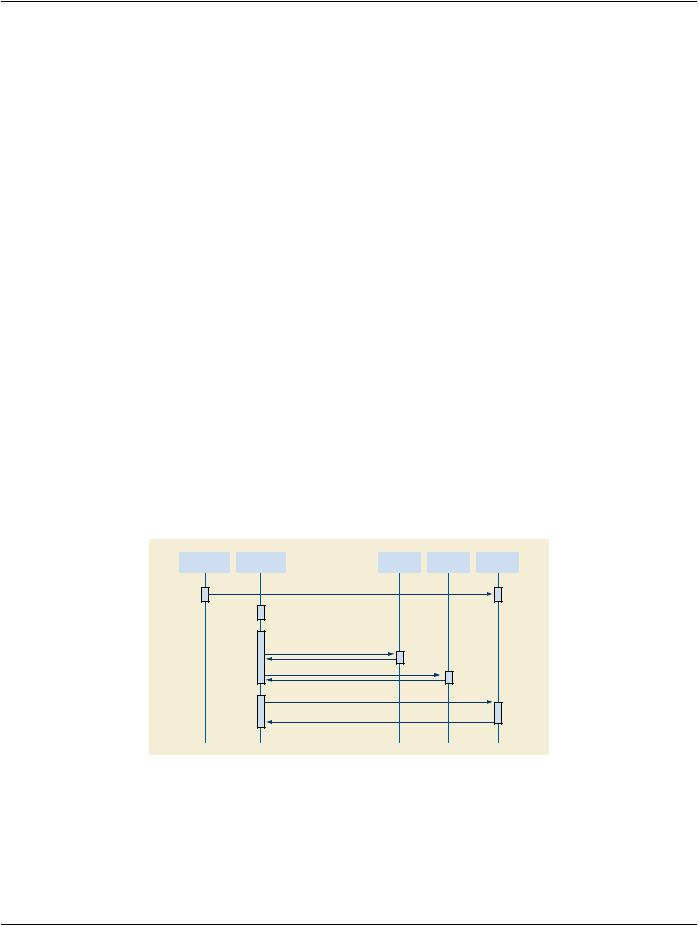
The network may have been designed in advance and the configuration specified in advance. It should be possible to pre-configure the configuration servers prior to other hardware installation. This should not preclude later updates or later configuration at specific devices.
LDAP defines a standard file exchange format for transmitting LDAP database subsets in an ASCII format. This file exchange format can be created by a variety of network configuration tools. There are also systems that use XML tools to create database subsets that can be loaded into LDAP servers. It is out of scope to specify these tools in any detail. The use case simply requires that such tools be available.
When the LDAP database is pre-configured using these tools, it is the responsibility of the tools to ensure that the resulting database entries have unique names. The unique name requirement is common to any LDAP database and not just to DICOM AE Titles. Consequently, most tools have mechanisms to ensure that the database updates that they create do have unique names.
Pre-Design |
|
New Machine |
|
DHCP |
|
NTP |
|
LDAP |
Configuration |
|
Installation |
|
|
|
|||
|
|
|
|
|
|
|
||
|
|
|
|
|
|
|
|
|
Load Entire configuration into server
Install Hardware
Obtain IP Parameters
IP Parameters
Obtain and maintain time
Query for own config
Pre-Design Configuration Found
Figure R.1-1. System Installation with Pre-configured Configuration
At an appropriate time, the installed Attribute is set on the device objects in the LDAP configuration.
- Standard -

DICOM PS3.17 2020a - Explanatory Information |
Page 207 |
R.1.2.2 Updating Configuration During Installation
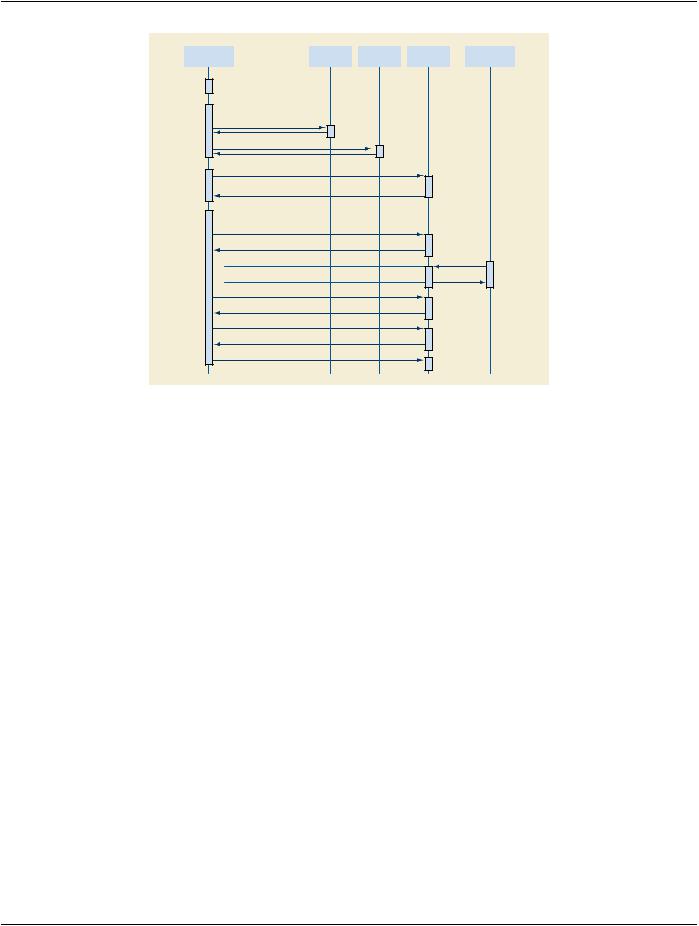
The"unconfigured"devicestartupbeginswithuseofthepre-configuredservicesfromDHCP,DNS,andNTP.Itthenperformsdevice configuration and updates the LDAP database. This description assumes that the device has been given permission to update the LDAP database directly.
a.DHCPisusedtoobtainIPrelatedparameters.TheDHCPrequestcanindicateadesiredmachinenamethatDHCPcanassociate withaconfigurationsavedattheDHCPserver.DHCPdoesnotguaranteethatthedesiredmachinenamewillbegrantedbecause it might already be in use, but this mechanism is often used to maintain specific machine configurations. The DHCP will also update the DNS server (using the DDNS mechanisms) with the assigned IP address and hostname information. Legacy note: A machine with pre-configured IP addresses, DNS servers, and NTP servers may skip this step. As an operational and document- ation convenience, the DHCP server database may contain the description of this pre-configured machine.
b.The list of NTP servers is used to initiate the NTP process for obtaining and maintaining the correct time. This is an ongoing process that continues for the duration of device activity. See Time Synchronization below.
c.The list of DNS servers is used to obtain the address of the DNS servers at this site. Then the DNS servers are queried to get the list of LDAP servers. This utilizes a relatively new addition to the DNS capabilities that permit querying DNS to obtain servers within a domain that provide a particular service.
d.The LDAP servers are queried to find the server that provides DICOM configuration services, and then obtain a description for the device matching the assigned machine name. This description includes device specific configuration information and a list of Network AEs. For the unconfigured device there will be no configuration found.
Note
These first four steps are the same as a normal start up (described below).
e.Through a device specific process it determines its internal AE structure. During initial device installation it is likely that the LDAP database lacks information regarding the device. Using some vendor specific mechanism, e.g., service procedures, the device configuration is obtained. This device configuration includes all the information that will be stored in the LDAP database. The fields for "device name" and "AE Title" are tentative at this point.
f. Each of the Network AE objects is created by means of the LDAP object creation process. It is at this point that LDAP determines whether the AE Title is in fact unique among all AE Titles. If the title is unique, the creation succeeds. If there is a conflict, the creation fails and "name already in use" is given as a reasonless uses propose/create as an atomic operation for creating unique items. The LDAP approach permits unique titles that comply with algorithms for structured names, check digits, etc. DICOM does not require structured names, but they are a commonplace requirement for other LDAP users. It may take multiple attempts to find an unused name. This multiple probe behavior can be a problem if "unconfigured device" is a common occurrence and name collisions are common. Name collisions can be minimized at the expense of name structure by selecting names such as "AExxxxxxxxxxxxxx" where "xxxxxxxxxxxxxx" is a truly randomly selected number. The odds of collision are then exceedingly small, and a unique name will be found within one or two probes.
g.Thedeviceobjectiscreated.ThedeviceinformationisupdatedtoreflecttheactualAEtitlesoftheAEobjects.AswithAEobjects, there is the potential for device name collisions.
h.The network connection objects are created as subordinates to the device object.
i. The AE objects are updated to reflect the names of the network connection objects.
The "unconfigured device" now has a saved configuration. The LDAP database reflects its present configuration.
In the following example, the new system needs two AE Titles. During its installation another machine is also being installed and takes one of the two AE Titles that the first machine expected to use. The new system then claims another different EYE-title that does not conflict.
- Standard -
Page 208 |
DICOM PS3.17 2020a - Explanatory Information |
New Machine |
|
DHCP |
|
NTP |
|
LDAP |
|
Another |
Installation |
|
|
|
|
Machine |
|||
|
|
|
|
|
|
|
||
|
|
|
|
|
|
|
|
|
Install Hardware
Obtain IP Parameters
IP Parameters
Obtain and maintain time
Query for own config
No Configuration Found
Configure System
Propose Creating new AE Title1
Creation Success
Propose Creating new AE Title2
Creation Success
Propose Creating new AE Title2
Creation Failure (Duplicate)
Propose Creating new AE Title3
Creation Success
Store Configuration Objects
Figure R.1-2. Configuring a System when network LDAP updates are permitted
R.1.2.3 Configure Client Then Update Server
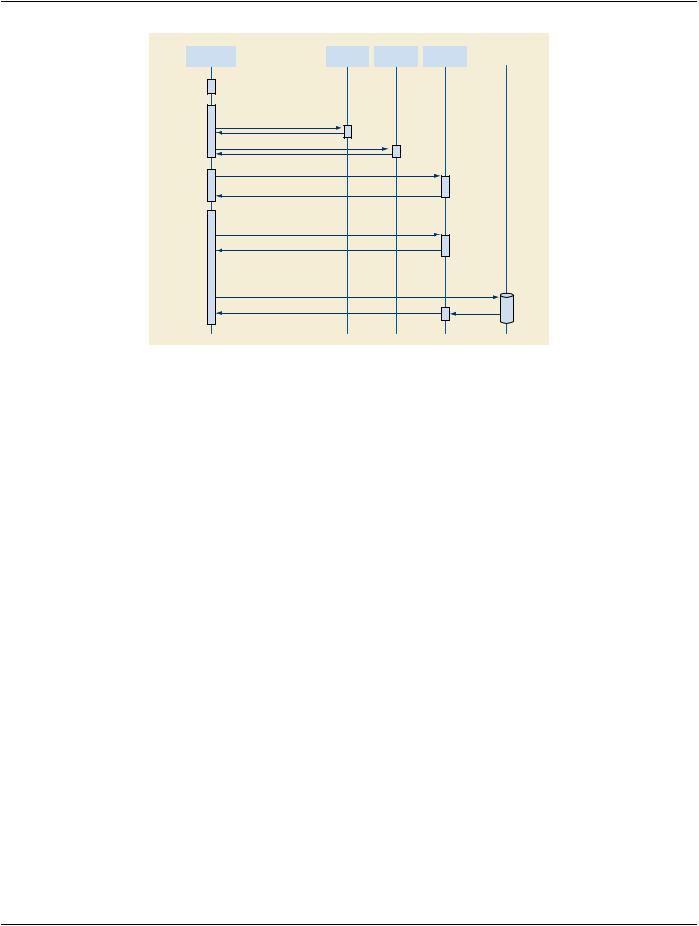
Much of the initial start up is the same for restarting a configured device and for configuring a client first and then updating the server. The difference is two-fold.
The AE Title uniqueness must be established manually, and the configuration information saved at the client onto a file that can then be provided to the LDAP server. There is a risk that the manually assigned AE Title is not unique, but this can be managed and is easier than the present entirely manual process for assigning AE Titles.
- Standard -
DICOM PS3.17 2020a - Explanatory Information |
Page 209 |
New Machine |
|
DHCP |
|
NTP |
|
LDAP |
Installation |
|
|
|
|||
|
|
|
|
|
|
|
|
|
|
|
|
|
|
Install Hardware
Obtain IP Parameters
IP Parameters
Obtain and maintain time
Query for own config
No Configuration Found
Configure System
PrQuery for candidate AE Titles
List of AE Titles already in use
Store Configuration Objects to a file
Update LDAP Server, resolve any
AE Title issues manually
Figure R.1-3. Configuring a system when LDAP network updates are not permitted
R.1.3 Distributed Update Propagation
The larger enterprise networks require prompt database responses and reliable responses during network disruptions. This implies the use of a distributed or federated database. These have update propagation issues. There is not a requirement for a complete and accurate view of the DICOM network at all times. There is a requirement that local subsets of the network maintain an accurate local view. E.g., each hospital in a large hospital chain may tolerate occasional disconnections or problems in viewing the network inform- ation in other hospitals in that chain, but they require that their own internal network be reliably and accurately described.
LDAP supports a variety of federation and distribution schemes. It specifically states that it is designed and appropriate for federated situationswheredistributionofupdatesbetweenfederatedserversmaybeslow.Itisspecificallydesignedforsituationswheredatabase updates are infrequent and database queries dominate.
R.2 Legacy Compatibility
Legacy devices utilize some internal method for obtaining the IP addresses, port numbers, and AE Titles of the other devices. For legacy compatibility, a managed node must be controlled so that the IP addresses, port numbers, and AE Titles do not change. This affects DHCP because it is DHCP that assigns IP addresses. The LDAP database design must preserve port number and AE Title so that once the device is configured these do not change.
DHCP was designed to deal with some common legacy issues:
a.Documenting legacy devices that do not utilize DHCP. Most DHCP servers can document a legacy device with a DHCP entry that describes the device. This avoids IP address conflicts. Since this is a manual process, there still remains the potential for errors. The DHCP server configuration is used to reserve the addresses and document how they are used. This documented entry approach is also used for complex multi-homed servers. These are often manually configured and kept with fixed configur- ations.
b.Specifying fixed IP addresses for DHCP clients. Many servers have clients that are not able to use DNS to obtain server IP ad- dresses. These servers may also utilize DHCP for start up configuration. The DHCP servers must support the use of fixed IP al- locationssothattheserversarealwaysassignedthesameIPaddress.Thisavoidsdisruptingaccessbytheserver'slegacyclients. This usage is quite common because it gives the IT administrators the centralized control that they need without disrupting oper- ations. It is a frequent transitional stage for machines on networks that are transitioning to full DHCP operation.
There are two legacy-related issues with time configuration:
- Standard -

Page 210 |
DICOM PS3.17 2020a - Explanatory Information |
a.The NTP system operates in UTC. The device users probably want to operate in local time. This introduces additional internal software requirements to configure local time. DHCP will provide this information if that option is configured into the DHCP server.
b.Device clock setting must be documented correctly. Some systems set the battery-powered clock to local time; others use UTC. Incorrect settings will introduce very large time transient problems during start up. Eventually NTP clients do resolve the huge mismatchbetweenbatteryclockandNTPclock,butthedevicemayalreadybeinmedicalusebythetimethisproblemisresolved. The resulting time discontinuity can then pose problems. The magnitude of this problem depends on the particular NTP client implementation.
R.3 Obtain Configuration of Other Devices
Managed devices can utilize the LDAP database during their own installation to establish configuration parameters such as the AE Title of destination devices. They may also utilize the LDAP database to obtain this information at run time prior to association nego- tiation.
R.3.1 Find AE When Given Device Type
The LDAP server supports simple relational queries. This query can be phrased:
Return devices where
DeviceType == <device type>
Then, for each of those devices, query
Return Network AE where
[ApplicationCluster == name]
The result will be the Network AE entries that match those two criteria. The first criteria selects the device type match. There are LDAP scoping controls that determine whether the queries search the entire enterprise or just this server. LDAP does not support complex queries, transactions, constraints, nesting, etc. LDAP cannot provide the hostnames for these Network AEs as part of a single query. Instead, the returned Network AEs will include the names of the network connections for each Network AE. Then the application would need to issue LDAP reads using the DN of the NetworkConnection objects to obtain the hostnames.
R.4 Device Start up
Normal start up of an already configured device will obtain IP information and DICOM information from the servers.
- Standard -