Материал: part17
DICOM PS3.17 2020a - Explanatory Information |
Page 211 |
Device |
|
|
DHCP |
|
|
DNS |
|
|
NTP |
|
LDAP |
||||||||||||||
|
|
Server |
|
Server |
|
Servers |
|
Server |
|||||||||||||||||
|
|
|
|
|
|
|
|
|
|
||||||||||||||||
|
|
|
|
|
|
|
|
|
|
|
|
|
|
|
|
|
|
|
|
|
|
|
|
|
|
|
|
|
|
Obtain IP Parameters |
a |
|
|
|
|
|
|
|
|
|
|
|
|
|
|
|
|
|
|
||
|
|
|
|
DHCP query |
|
|
|
|
|
|
|
|
|
|
|
|
|
|
|
|
|
||||
|
|
|
|
Update DNS data (DDNS) |
a |
|
|
a |
|
|
|
|
|
|
|
|
|
|
|
|
|
||||
|
|
|
|
Obtain Time |
b |
|
|
|
|
|
|
|
|
|
|
|
|
|
|
|
|||||
|
|
|
|
|
|
|
|
|
|
|
|
|
|
|
|
|
|
|
|||||||
|
|
|
|
Provide Time |
b |
|
|
|
|
|
|
|
|
|
|
|
|
|
|
|
|||||
|
|
|
|
|
|
|
|
|
|
|
|
|
|
|
|
|
|
|
|||||||
|
|
|
|
Obtain saved Configuration Information |
|
|
|
|
|
|
|
|
|
|
|
|
|
|
|
|
|
|
|
|
|
|
|
|
|
|
|
|
|
|
|
|
|
|
|
|
|
|
|
|
|
|
|
|
|
||
|
|
|
|
|
|
|
|
|
|
|
|
|
|
|
|
|
|
|
|
|
|
|
|
||
|
|
|
|
Find LDAP servers |
c |
|
|
|
|
|
|
|
|
|
|
|
|
|
|
|
|||||
|
|
|
|
|
|
c |
|
|
|
|
|
|
|
|
|
|
|
|
|
|
|
||||
|
|
|
|
Obtain saved Configuration |
d |
|
|
|
|
|
|
|
|
|
|
|
|
|
|
|
|||||
|
|
|
|
|
|
d |
|
|
|
|
|
|
|
|
|
|
|
|
|
|
|
||||
|
|
|
|
Activate saved Configuration |
|
|
|
|
|
|
|
|
|
|
|
|
|
|
|
|
|
|
|
|
|
|
|
|
|
|
|
|
|
|
|
|
|
|
|
|
|
|
|
|
|
|
|
|
|
|
|
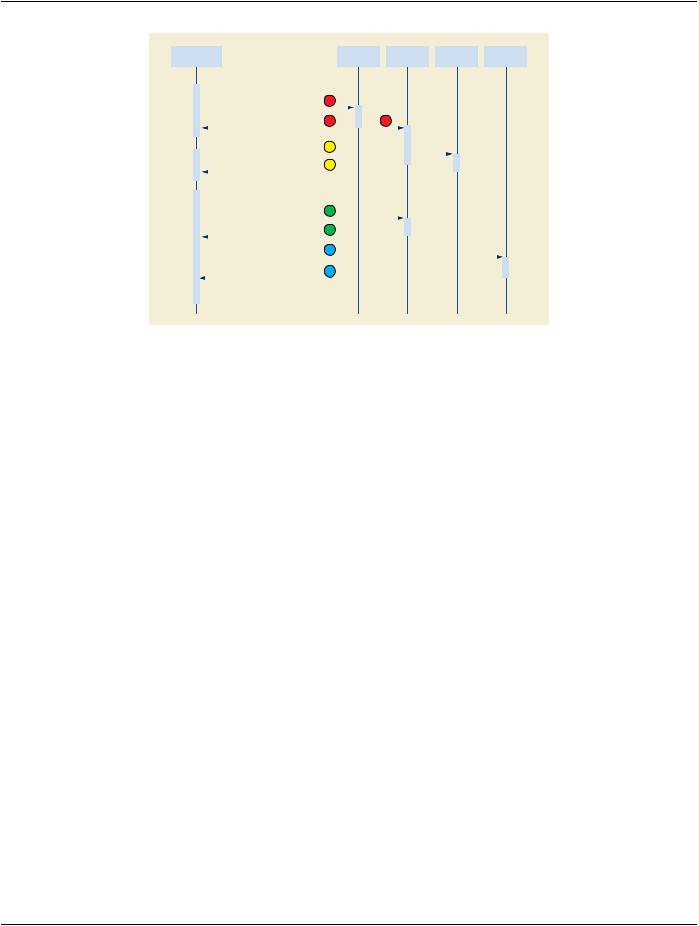
Figure R.4-1. Configured Device Start up (Normal Start up)
The device start up sequence is:
a.DHCPisusedtoobtainIPrelatedparameters.TheDHCPrequestcanindicateadesiredmachinenamethatDHCPcanassociate withaconfigurationsavedattheDHCPserver.DHCPdoesnotguaranteethatthedesiredmachinenamewillbegrantedbecause it might already be in use, but this mechanism is often used to maintain specific machine configurations. The DHCP will also update the DNS server (using the DDNS mechanisms) with the assigned IP address and hostname information. Legacy note: A machine with pre-configured IP addresses, DNS servers, and NTP servers may skip this step. As an operational and document- ation convenience, the DHCP server database may contain the description of this pre-configured machine.
b.The list of NTP servers is used to initiate the NTP process for obtaining and maintaining the correct time. This is an ongoing process that continues for the duration of device activity. See Time Synchronization below.
c.The list of DNS servers is used to obtain the list of LDAP servers. This utilizes a relatively new addition to the DNS capabilities that permit querying DNS to obtain servers within a domain that provide a particular service.
d.The"nearest"LDAPserverisqueriedtoobtainadescriptionforthedevicematchingtheassignedmachinename.Thisdescription includes device specific configuration information and a list of Network AEs.
Note
A partially managed node may reach this point and discover that there is no description for that device in the LDAP database. During installation (as described above) this may then proceed into device configuration. Partially managed devices may utilize an internal configuration mechanism.
e.The AE descriptions are obtained from the LDAP server. Key information in the AE description is the assigned AE Title. The AE descriptions probably include vendor unique information in either the vendor text field or vendor extensions to the AE object. The details of this information are vendor unique. DICOM is defining a mandatory minimum capability because this will be a common need for vendors that offer dynamically configurable devices. The AE description may be present even for devices that do not support dynamic configuration. If the device has been configured with an AE Title and description that is intended to be fixed, then a description should be present in the LDAP database. The device can confirm that the description matches its stored con- figuration.Thepresenceofthe AE Titleinthedescription willpreventlater networkactivitiesfrominadvertently re-using thesame AE Title for another purpose. The degree of configurability may also vary. Many simple devices may only permit dynamic config- uration of the IP address and AE Title, with all other configuration requiring local service modifications.
f. The device performs whatever internal operations are involved to configure itself to match the device description and AE descrip- tions.
- Standard -

Page 212 |
DICOM PS3.17 2020a - Explanatory Information |
At this point, the device is ready for regular operation, the DNS servers will correctly report its IP address when requested, and the LDAP server has a correct description of the device, Network AEs, and network connections.
R.5 Shutdown
R.5.1 Shutdown
The lease timeouts eventually release the IP address at DHCP, which can then update DNS to indicate that the host is down. Clients that utilize the hostname information in the LDAP database will initially experience reports of connection failure; and then after DNS is updated, they will get errors indicating the device is down when they attempt to use it. Clients that use the IP entry directly will ex- perience reports of connection failure.
R.5.2 Online/offline
A device may be deliberately placed offline in the LDAP database to indicate that it is unavailable and will remain unavailable for an extended period of time. This may be utilized during system installation so that pre-configured systems can be marked as offline until the system installation is complete. It can also be used for systems that are down for extended maintenance or upgrades. It may be useful for equipment that is on mobile vans and only present for certain days.
For this purpose a separate Installed Attribute has been given to devices, Network AEs, and Network Connections so that it can be manually managed.
R.6 Time Synchronization
Medical device time requirements primarily deal with synchronization of machines on a local network or campus. There are very few requirements for accurate time (synchronized with an international reference clock). DICOM time users are usually concerned with:
a.local time synchronization between machines
b.local time base stability. This means controlling the discontinuities in the local time and its first derivative. There is also an upper bound on time base stability errors that results from the synchronization error limits.
c.international time synchronization with the UTC master clocks
Other master clocks and time references (e.g., sidereal time) are not relevant to medical users.
R.6.1 High Accuracy Time Synchronization
High accuracy time synchronization is needed for devices like cardiology equipment. The measurements taken on various different machines are recorded with synchronization modules specifying the precise time base for measurements such as waveforms and Multi-frame Images. These are later used to synchronize data for analysis and display.
Typical requirements are:
Local synchronization
Synchronized to within approximately 10 millisecond. This corresponds to a few percent of a typical heartbeat. Under some circum- stances, the requirements may be stricter than this.
Time base stability
During the measurement period there should be no discontinuities greater than a few milliseconds. The time base rate should be within 0.01% of standard time rate.
International Time Synchronization
There are no special extra requirements. Note however that time base stability conflicts with time synchronization when UTC time jumps (e.g., leap seconds).
- Standard -

DICOM PS3.17 2020a - Explanatory Information |
Page 213 |
R.6.2 Ordinary Time Synchronization
Ordinary medical equipment uses time synchronization to perform functions that were previously performed manually, e.g., record- keeping and scheduling. These were typically done using watches and clocks, with resultant stability and synchronization errors measured in seconds or longer. The most stringent time synchronization requirements for networked medical equipment derive from some of the security protocols and their record keeping.
Ordinary requirements are:
Local synchronization
Synchronizedtowithinapproximately500milliseconds.Somesecuritysystemshaveproblemswhenthesynchronizationerrorexceeds 1 second.
Time base stability
Large drift errors may cause problems. Typical clock drift errors approximately 1 second/day are unlikely to cause problems. Large discontinuities are permissible if rare or during start up. Time may run backwards, but only during rare large discontinuities.
International Time Synchronization
Some sites require synchronization to within a few seconds of UTC. Others have no requirement.
R.6.3 Background
R.6.3.1 Unsynchronized Time
The local system time of a computer is usually provided by two distinct components.
a.There is a battery-powered clock that is used to establish an initial time estimate when the machine is turned on. These clocks are typically very inaccurate. Local and international synchronization errors are often 5-10 minutes. In some cases, the battery clock is incorrect by hours or days.
b.The ongoing system time is provided by a software function and a pulse source. The pulse source "ticks" at some rate between 1-1000Hz.Ithasanominaltickratethatisusedbythesystemsoftware.Foreverytickthesystemsoftwareincrementsthecurrent time estimate appropriately. E.g., for a system with a 100Hz tick, the system time increments 10ms each tick.
This lacks any external synchronization and is subject to substantial initial error in the time estimate and to errors due to systematic and random drift in the tick source. The tick sources are typically low cost quartz crystal based, with a systematic error up to approx- imately 10-5 in the actual versus nominal tick rate and with a variation due to temperature, pressure, etc. up to approximately 10-5. This corresponds to drifts on the order of 10 seconds per day.
R.6.3.2 Network Synchronized Time
There is a well established Internet protocol (NTP) for maintaining time synchronization that should be used by DICOM. It operates in several ways.
The most common is for the computer to become an NTP client of one or more NTP servers. As a client it uses occasional ping-pong NTP messages to:
a.Estimate the network delays. These estimates are updated during each NTP update cycle.
b.Obtainatimeestimatefromtheserver.Eachestimateincludestheserver'sownstatisticalcharacteristicsandaccuracyassessment of the estimate.
c.Use the time estimates from the servers, the network delay estimates, and the time estimates from the local system clock, to obtain a new NTP time estimate. This typically uses modern statistical methods and filtering to perform optimal estimation.
d.Use the resulting time estimate to
1.Adjust the system time, and
- Standard -

Page 214 |
DICOM PS3.17 2020a - Explanatory Information |
2.Update drift and statistical characteristics of the local clock.
The local applications do not normally communicate with the NTP client software. They normally continue to use the system clock services. The NTP client software adjusts the system clock. The NTP standard defines a nominal system clock service as having two adjustable parameters:
a.The clock frequency. In the example above, the nominal clock was 100Hz, with a nominal increment of 10 milliseconds. Long term measurement may indicate that the actual clock is slightly faster and the NTP client can adjust the clock increment to be 9.98 milliseconds.
b.The clock phase. This adjustment permits jump adjustments, and is the fixed time offset between the internal clock and the es- timated UTC.
The experience with NTP in the field is that NTP clients on the same LAN as their NTP server will maintain synchronization to within approximately 100 microseconds. NTP clients on the North American Internet and utilizing multiple NTP servers will maintain syn- chronization to within approximately 10 milliseconds.
There are low cost devices with only limited time synchronization needs. NTP has been updated to include SNTP for these devices. SNTP eliminates the estimation of network delays and eliminates the statistical methods for optimal time estimation. It assumes that the network delays are nil and that each NTP server time estimate received is completely accurate. This reduces the development and hardware costs for these devices. The computer processing costs for NTP are insignificant for a PC, but may be burdensome for very small devices. The SNTP synchronization errors are only a few milliseconds in a LAN environment. They are very topology sensitive and errors may become huge in a WAN environment.
Most NTP servers are in turn NTP clients to multiple superior servers and peers. NTP is designed to accommodate a hierarchy of server/clients that distributes time information from a few international standard clocks out through layers of servers.
R.6.3.3 External Clocks
The NTP implementations anticipate the use of three major kinds of external clock sources:
External NTP servers
ManyISPsandgovernmentagenciesofferaccesstoNTPserversthatareinturnsynchronizedwiththeinternationalstandardclocks. This access is usually offered on a restricted basis.
External clock broadcasts
The US, Canada, Germany, and others offer radio broadcasts of time signals that may be used by local receivers attached to an NTP server.TheUSandRussiabroadcasttimesignalsfromsatellites,e.g.,GPS.Somemobiletelephoneservicesbroadcasttimesignals. These signals are synchronized with the international standard clocks. GPS time signals are popular worldwide time sources. Their primary problem is difficulties with proper antenna location and receiver cost. Most of the popular low cost consumer GPS systems save money by sacrificing the clock accuracy.
External pulse sources
For extremely high accuracy synchronization, atomic clocks can be attached to NTP servers. These clocks do not provide a time es- timate,buttheyprovideapulsesignalthatisknowntobeextremelyaccurate.Theoptimalestimationlogiccanusethisincombination with other external sources to achieve sub microsecond synchronization to a reference clock even when the devices are separated by the earth's diameter.
The details regarding selecting an external clock source and appropriate use of the clock source are outside the scope of the NTP protocol. They are often discussed and documented in conjunction with the NTP protocol and many such interfaces are included in the reference implementation of NTP.
R.6.4 SNTP Restrictions
In theory, servers can be SNTP servers and NTP servers can be SNTP clients of other servers. This is very strongly discouraged. The SNTP errors can be substantial, and the clients of a server using SNTP will not have the statistical information needed to assess the magnitude of these errors. It is feasible for SNTP clients to use NTP servers. The SNTP protocol packets are identical to the NTP protocol packets. SNTP differs in that some of the statistical information fields are filled with nominal SNTP values instead of having actual measured values.
- Standard -

DICOM PS3.17 2020a - Explanatory Information |
Page 215 |
R.6.5 Implementation Considerations
There are several public reference implementations of NTP server and client software available. These are in widespread use and have been ported to many platforms (including Unix, Windows, and Macintosh). There are also proprietary and built-in NTP services for some platforms (e.g., Windows 2000). The public reference implementations include sample interfaces to many kinds of external clock sources.
Therearesignificantperformanceconsiderationsintheselectionoflocationsforserversandclients.Devicesthatneedhighaccuracy synchronization should probably be all on the same LAN together with an NTP server on that LAN.
Real time operating system (RTOS) implementations may have greater difficulties. The reference NTP implementations have been ported to several RTOSs. There were difficulties with the implementations of the internal system clock on the RTOS. The dual fre- quency/phase adjustment requirements may require the clock functions to be rewritten. The reference implementations also require access to a separate high resolution interval timer (with sub microsecond accuracy and precision). This is a standard CPU feature for modern workstation processors, but may be missing on low end processors.
AnRTOS implementationwithonlyordinarysynchronizationrequirementsmightchoosetowritetheirownSNTPonlyimplementation rather than use the reference NTP implementation. The SNTP client is very simple. It may be based on the reference implementation orwrittenfromscratch.TheoperatingsystemsupportneededforaccurateadjustmentisoptionalforSNTPclients.Theonlyrequirement is the time base stability requirement, which usually implies the ability to specify fractional seconds when setting the time.
The conflict between the user desire to use local time and the NTP use of UTC must be resolved in the device. DHCP offers the ability to obtain the offset between local time and UTC dynamically, provided the DHCP server supports this option. There remain issues such as service procedures, start up in the absence of DHCP, etc.
The differences between local time, UTC, summer time, etc. are a common source of confusion and errors setting the battery clock. The NTP algorithms will eventually resolve these errors, but the final convergence on correct time may be significantly delayed. The device might be ready for medical use before these errors are resolved.
- Standard -