Материал: part17

Внимание! Если размещение файла нарушает Ваши авторские права, то обязательно сообщите нам

DICOM PS3.17 2020a - Explanatory Information​

Page 321​

GG JPIP Referenced Pixel Data Transfer​

Syntax Negotiation (Informative)​

The JPIP Referenced Pixel Data transfer syntaxes allow transfer of image objects with a reference to a non-DICOM network service​ that provides the pixel data rather than encoding the pixel data in (7FE0,0010).​

The use cases for this extension to the Standard relate to an application's desire to gain access to a portion of DICOM pixel data​ without the need to wait for reception of all the pixel data. Examples are:​

1.​Stack Navigation of a large CT Study.​

In this case, it is desirable to quickly scroll through this large set of data at a lower resolution and once the anatomy of interest​ is located the full resolution data is presented. Initially lower resolution images are requested from the server for the purpose of​ stack navigation. Once a specific image is identified the system requests the rest of the detail from the server.​

2.​Large Single Image Navigation.​

In cases such as microscopy, very large images may be generated. It is undesirable to wait for the complete pixel data to be​ loaded when only a small portion of the specific image is of interest. Additionally, this large image may exceed the display cap-​ abilitiesthusresultinginadecimationoftheimagewhendisplayed.Alowerresolutionimage(i.e.,onethatmatchestheresolution​ of the display) is all that is required, as additional data cannot be fully rendered. Once an area of interest is determined, the ap-​ plication can pan and zoom to this area and request additional detail to fill the screen resolution.​

3.​Thumbnails.​

It is desirable to generate thumbnail representations for a study. This has been accomplished through various means, many of​ which require the client to receive the complete pixel data from the server to generate the thumbnail image. This uses significant​ network bandwidth.​

The thumbnails can be considered low-resolution representations of the image. The application can request a low-resolution​ representation of the image for use as a thumbnail.​

4.​Display by Dimension.​

Multi-frameImagesmayencodemultipledimensions.Itisdesirableforanapplicationtoaccessonlythespecificframesofinterest​ in a particular dimension without the need to receive the complete pixel data. By using the multi-dimensional description, applic-​ ations using the JPIP protocol may request frames of the Multi-frame Image.​

Theassociationnegotiationbetweentheinitiatorandacceptorcontrolswhenthismethodoftransferisused.Anacceptorcanpotentially​ accept both the JPIP Referenced Pixel Data transfer syntax and a non-JPIP transfer syntax on different presentation contexts. When​ an acceptor accepts both of these transfer syntaxes, the initiator chooses the presentation context.​

Examples:​

For the following cases:​

•​AE1 requests images from AE2​

•​AE1 implements a C-MOVE SCU, as well as a C-STORE SCP. AE2 implements a C-MOVE SCP, as well as a C-STORE SCU​

Case 1:​

•​AE1 and AE2 both support both a JPIP Referenced Pixel Data Transfer Syntax and a non-JPIP Transfer Syntax​

•​AE1 makes a C-MOVE request to AE2​

•​AE2 proposes two presentation contexts to AE1, one for with a JPIP Referenced Pixel Data Transfer Syntax, and the other with a​ non-JPIP Transfer Syntax​

- Standard -​

Page 322​

DICOM PS3.17 2020a - Explanatory Information​

•​AE1 accepts both presentation contexts​

•​AE2 may choose either presentation context to send the object​

•​AE1 must be able to either receive the pixel data in the C-STORE message, or to be able to obtain it from the provider URL​ Case 2:​

•​AE1 supports only the JPIP Referenced Pixel Data Transfer Syntax​

•​AE2 supports both a JPIP Referenced Pixel Data Transfer Syntax and a non-JPIP Transfer Syntax​ •​AE1 makes a C-MOVE request to AE2​

•​AE2 proposes to AE1 either​

•​two presentation contexts, one for with a JPIP Referenced Pixel Data Transfer Syntax, and the other with a non-JPIP Transfer​ Syntax, or​

•​a single presentation context with both a JPIP Referenced Pixel Data Transfer Syntax and a non-JPIP Transfer Syntax​

•​AE1 accepts only the presentation context with the JPIP Referenced Pixel Data Transfer Syntax, or only the JPIP Referenced Pixel​ Data Transfer Syntax within the single presentation context proposed​

•​AE2 sends the object with the JPIP Referenced Pixel Data Transfer Syntax​ •​AE1 must be able to either retrieve the pixel data from the provider URL​ For the following cases:​

•​AE1 requests images from AE2​

•​AE1 implements a C-GET SCU. AE2 implements a C-GET SCP​ Case 3:​

•​AE1 and AE2 both support both a JPIP Referenced Pixel Data Transfer Syntax and a non-JPIP Transfer Syntax​

•​In addition to the C-GET presentation context, AE2 proposes to AE1 two presentation contexts for storage sub-operations, one for​ with a JPIP Referenced Pixel Data Transfer Syntax, and the other with a non-JPIP Transfer Syntax​

•​AE2 accepts both storage presentation contexts​ •​AE1 makes a C-GET request to AE2​

•​AE2 may choose either presentation context to send the object​

•​AE1 must be able to either receive the pixel data in the C-STORE message, or to be able to obtain it from the provider URL​ Case 4:​

•​AE1 supports only the JPIP Referenced Pixel Data Transfer Syntax​

•​AE2 supports both a JPIP Referenced Pixel Data Transfer Syntax and a non-JPIP Transfer Syntax​

•​In addition to the C-GET presentation context, AE2 proposes to AE1 a single presentation context for storage sub-operations with​ a JPIP Referenced Pixel Data Transfer Syntax​

•​AE2 accepts the storage presentation context​ •​AE1 makes a C-GET request to AE2​

•​AE2 sends the object with the JPIP Referenced Pixel Data Transfer Syntax​ •​AE1 must be able to either retrieve the pixel data from the provider URL​

- Standard -​

DICOM PS3.17 2020a - Explanatory Information​

Page 323​

HH Segmentation Encoding Example​ (Informative)​

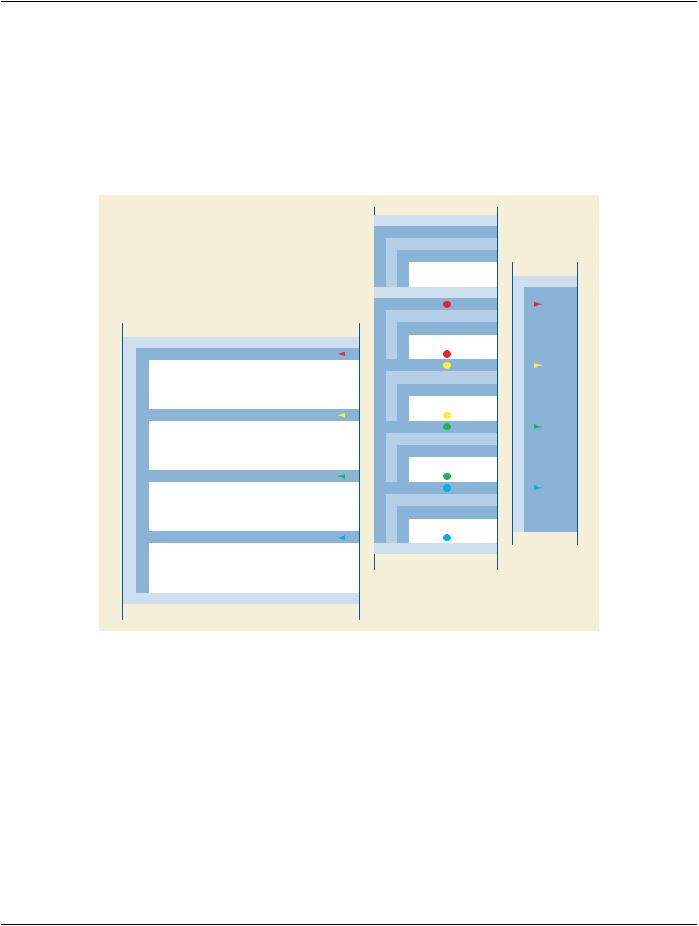
Figure HH-1 depicts an example of how the data is organized within an instance of the Segmentation IOD. Each item in the Segment​ Sequence provides the Attributes of a segment. The source image used in all segmentations is referenced in the Shared Functional​ Groups Sequence. Each item of the Per-frame Functional Groups Sequence maps a frame to a segment. The Pixel Data classifies​ the corresponding pixels/voxels of the source Image.​


Other Attributes


Shared Functional Groups Sequence


Item 1 (Shared - All Frames)


Derivative Image Sequence


Item 1


Reference to source image


(external object)


Pixel Data


Per-frame Functional Groups Sequence


Frame 1


Item 1 (Frame 1)


Segment Identification Sequence


Other Attributes


Item 1


Segment Sequence


Referenced Segment


Number =


Item 1 (Segment 1)


Frame 2


Segment Number = 1


Item 2 (Frame 2)


Segment Label = Left Ventricle


Segment Identification Sequence


Segment Property Category Code Sequence = Tissue


Item 1


Segment Property Type Code Sequence = Left Ventricle


Referenced Segment


Number =


Item 2 (Segment 2)


Frame 3


Segment Number = 2


Item 3 (Frame 3)


Segment Label = Right Ventricle


Segment Identification Sequence


Segment Property Category Code Sequence = Tissue


Item 1


Segment Property Type Code Sequence = Right Ventricle


Referenced Segment


Number =


Item 3 (Segment 3)


Frame 4


Segment Number = 3


Item 4 (Frame 4)


Segment Label = Stent


Segment Identification Sequence


Segment Property Category Code Sequence = Physical Object


Item 1


Segment Property Type Code Sequence = Stent


Referenced Segment


Number =


Item 4 (Segment 4)


Segment Number = 4


Other Attributes


Segment Label = Aorta


Segment Property Category Code Sequence = Anatomical Structure


Segment Property Type Code Sequence = Aorta


Other Attributes


Figure HH-1. Segment Sequence Structure and References​

- Standard -​

Page 324​

DICOM PS3.17 2020a - Explanatory Information​

- Standard -​

DICOM PS3.17 2020a - Explanatory Information​

Page 325​

II Use of Product Characteristics Attributes​ in Composite SOP Instances (Informative)​

Bar coding or RFID tagging of contrast agents, drugs, and devices can facilitate the provision of critical information to the imaging​ modality, such as the active ingredient, concentration, etc. The Product Characteristics Query SOP Class allows a modality to submit​ the product bar code (or RFID tag) to an SCP to look up the product type, active substance, size/quantity, or other parameters of the​ product.​

This product information can be included in appropriate Attributes of the Contrast/Bolus, Device, or Intervention Modules of the​ Composite SOP Instances created by the modality. The product information then provides key acquisition context data necessary for​ the proper interpretation of the SOP Instances.​

This annex provides informative information about mapping from the Product Characteristics Module Attributes of the Product Char-​ acteristics Query to the Attributes of Composite IODs included in several Modules.​

Within this section, if no Product Characteristics Module source for the Attribute value is provided, the modality would need to provide​ local data entry or user selection from a pick list to fill in appropriate values. Some values may need to be calculated based on user-​ performed dilution of the product at the time of administration.​

II.1 Contrast/bolus Module​

Table II-1. Contrast/Bolus Module Attribute Mapping​

Contrast/Bolus Module Attribute​

Tag​

Product Characteristics Module Source​

Name​


Contrast/Bolus Agent​

(0018,0010)​

Product Name (0044,0008)​


Note​


If Product Name is multi-valued, use the first value.​

Contrast/Bolus Agent Sequence​

(0018,0012)​

--​

>IncludeTable8.8-1“CodeSequenceMacroAttributes”inPS3.3​ProductTypeCodeSequence(0044,0007)>'CodeSequenceMacro'​

Contrast/Bolus Route​

(0018,1040)​


Contrast/BolusAdministrationRoute​

(0018,0014)​


Sequence​


>IncludeTable8.8-1“CodeSequenceMacroAttributes”inPS3.3​

>Additional Drug Sequence​

(0018,002A)​


>IncludeTable8.8-1“CodeSequenceMacroAttributes”inPS3.3​

Contrast/Bolus Volume​

(0018,1041)​

If contrast is administered without dilution, and using full contents​


of dispensed product:​


Product Parameter Sequence (0044,0013) > Numeric Value​


(0040,A30A) where:​


Product Parameter Sequence > Concept Name Code Sequence​


(0040,A043) value is (118565006, SCT, "Volume")​


Product Parameter Sequence > Measurement Units Code​


Sequence (0040,08EA) is (ml, UCUM, "ml")​

Contrast/Bolus Start Time​

(0018,1042)​


Contrast/Bolus Stop Time​

(0018,1043)​


- Standard -​

Источник: https://studfile.net/preview/14585770/