Материал: part17

Внимание! Если размещение файла нарушает Ваши авторские права, то обязательно сообщите нам

Page 566​

DICOM PS3.17 2020a - Explanatory Information​


RIS


PACS

3D


Reporting


Workstation


Workstation


Reporting

Workstation

Store 3D Views

N-ACTION COMPLETE

Confim Availability of Task X inputs

Query Input Image Instances

Create UPS for Task X

Query Worklist (C-FIND)

Retrieve full detail for Task X (N-GET)

Claim Task X (N-ACTION IN-PROGRESS IT-UID)

Retrieve Input Image Instances

Cancel Task X (N-ACTION CANCEL IT-UID)

Add UPS Task Y (N-CREATE)

Query Worklist (C-FIND)

Select UPS for Task X

Create Transaction UID

Start Task X and decide to put it back on the worklist for Dr. Z

Populate Task Y with details from Task X. Record Task X as the

...Replaced Procedure Step

Select UPS

for Task Y

...

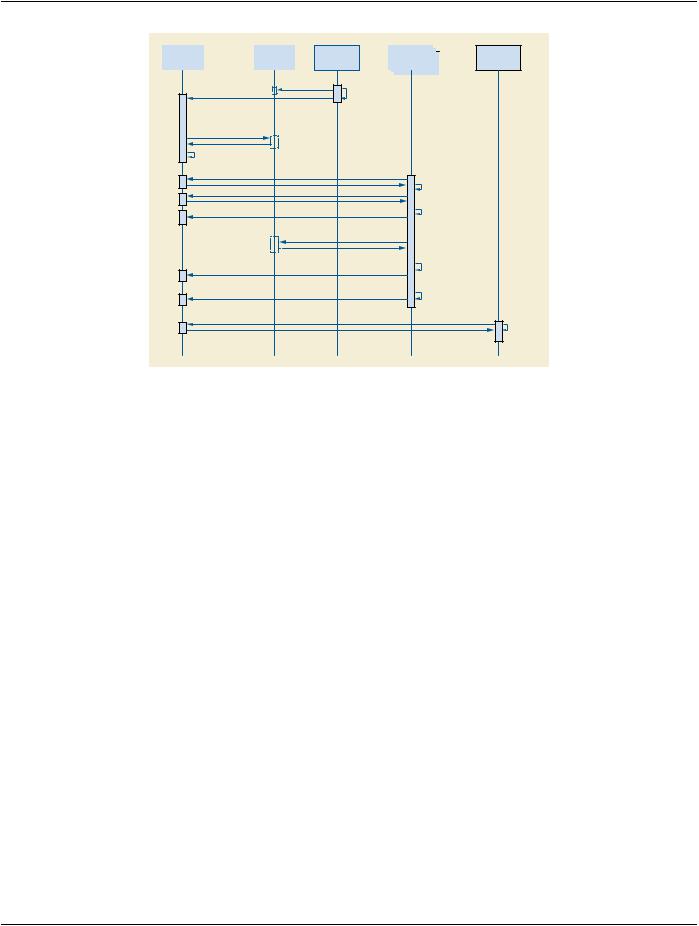
Figure GGG.3-1. Diagram of Reporting Workflow​

You could also imagine the 3D workstation is a Mammo CAD workstation. If the first radiologist completed the report, the RIS could​ easily schedule Task Y as the over-read by another radiologist.​

For further discussion, refer to the Section GGG.2.7 material on Hand-offs, Fail-overs and Putting Tasks Back on the Worklist.​

GGG.2.4 Third Party Cancel​

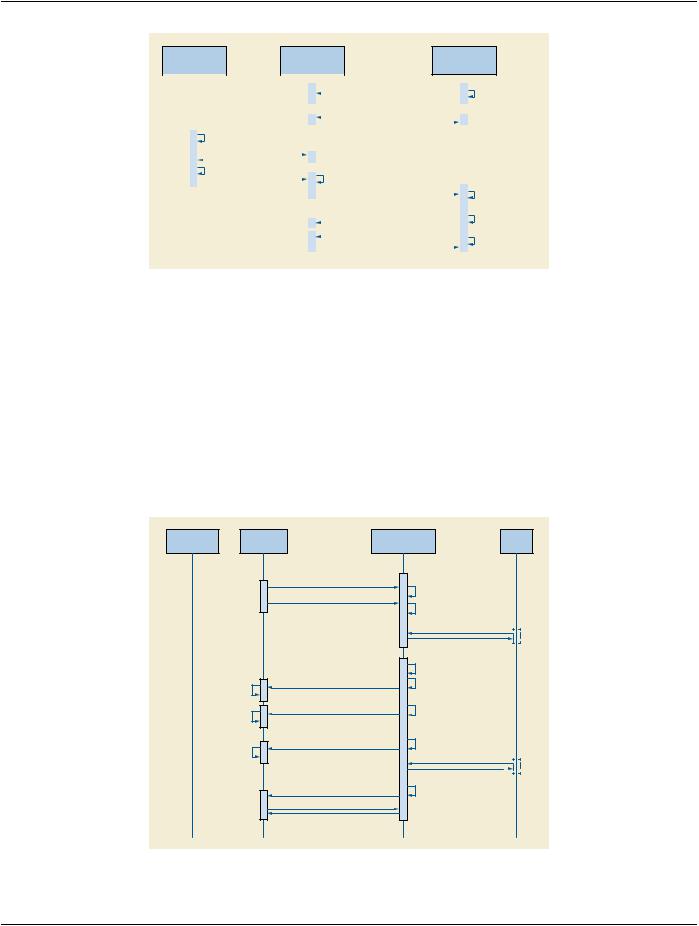
Cancel requests are always directed to the system managing the UPS instance since it is the SCP. When the UPS is being managed​ byonesystem(forexampleaTreatmentManagementSystem)andperformedbyasecondsystem(forexampleaTreatmentDelivery​ System), a third party would send the cancel request to the TMS and cancellation would take place as shown below.​

Performing SCUs are not required to react to cancel requests, or even to listen for them, and in some situations would be unable to​ abort the task represented by the UPS even if they were listening. In the diagram below we assume the performing SCU is listening,​ willing, and able to cancel the task.​

If the User had sent the cancel request while the UPS was still in the SCHEDULED state, the SCP (i.e., the TMS) could simply have​ canceled the UPS internally. Since the UPS state was IN PROGRESS, it was necessary to send the messages as shown. Note that​ since the TDS has no need for the UPS instance to persist, it subscribed without setting a Deletion Lock, and so it didn't need to​ bother unsubscribing later.​

- Standard -​

DICOM PS3.17 2020a - Explanatory Information​

Page 567​

Treatment

Treatment

User Terminal Managment Delivery System

System


Start Task X (N-ACTION IN PROGRESS [T-UID])


Create Transaction UID


Start Listening (N-ACTION SUBSCRIBE (Task X))


User decides to cancel Task X


Return Current Task X Status (N-EVENT)


...


Find UPS Task of Interest: (C-FIND)


User selects Task X


Copy Contact URI from Request into N-EVENT


Request Task X Cancel


Display Cancel Request


(N-ACTION REQUEST CANCEL)


Report Task X Cancel Requested (N-EVENT)


for Task X and Contact


URI to Operator


Operator Pauses Task &


Update Task X Details (N-SET(T-UID))


Uses Contact URI to call


Cancel Task X (N-ACTION CANCELED [T-UID])


User & discuss cancel


Operator agrees and


Report Task X Canceled (N-EVENT)


cancels Task X


Figure GGG.4-1. Diagram of Third Party Cancel​

GGG.2.5 Radiation Therapy Dose Calculation Push Workflow​

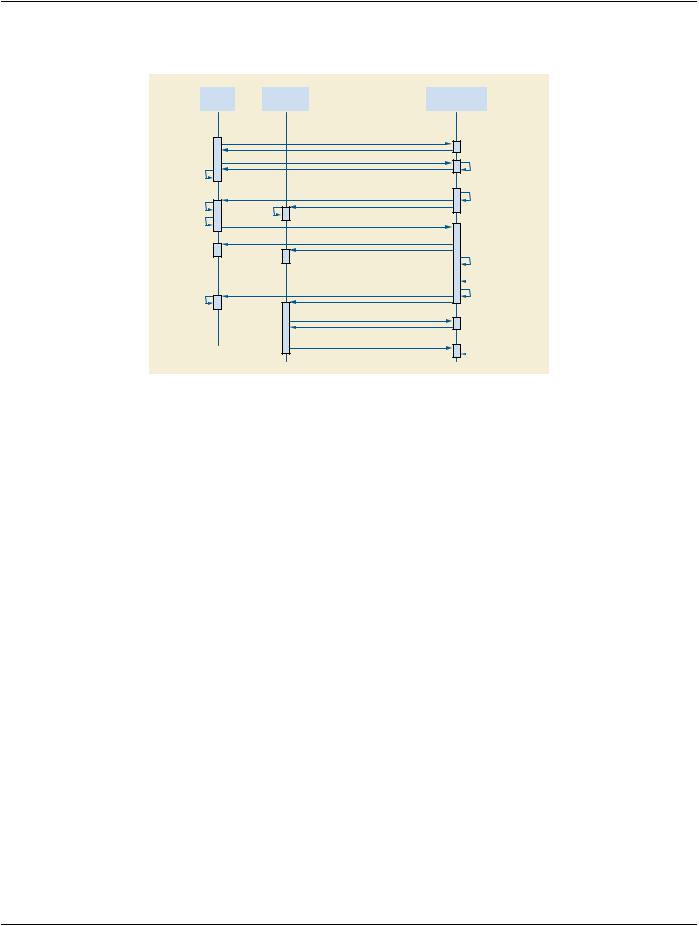
In this example, users schedule tasks to a shared dose calculation system and need to track progress. This example is intended as​ a demonstration of UPS and should not be taken as prescriptive of RT Therapy procedures.​

Pushing the tasks avoids problems with a pull workflow such as the server having to continually poll worklists on (a large number of)​ possible clients; needing to configure the server to know about all the clients; reporting results to a user who might be at several loc-​ ations; and associating the results with clients automatically. Also, when performing machines each have unique capabilities, the​ scheduling must target individual machines, and there can be advantages for integrating the scheduling and performing activities like​ this.​

Although not shown in the diagram, the User could have gone to a User Terminal ("Watcher") and monitored the progress from there​ by doing a C-FIND and selecting/subscribing to Task X.​

User Terminal

User Control

Console

Dose Calculation

Archive

System

Add UPS Task (N-CREATE)

Subscribe for Task X (N-ACTION SUBSCRIBE)

Report Task X In-Progress (N-EVENT)

Display Progress

“Started”

Report Task X Progress (N-EVENT)

Display Progress

“Beam 1 of 5”

Report Task X Progress (N-EVENT)

Display Progress

“Beam 5 of 5”

Report Task X Complete (N-EVENT)

Retrieve Final State Details (N-GET)

Create UPS for Task X

Add Console to Task X

Subscriber List

...

Decide to do Task X

Update Task X UPS Status to IN-PROGRESS

Update Task X UPS Progress to

“Beam 1 of 5”

...

Update Task X UPS Progress to “Beam 5 of 5”

Store Result Instances

Update Task X Details

Update Task X UPS Status to COMPLETE

Figure GGG.5-1. Diagram of Radiation Therapy Planning Push Workflow​

- Standard -​

Page 568​

DICOM PS3.17 2020a - Explanatory Information​

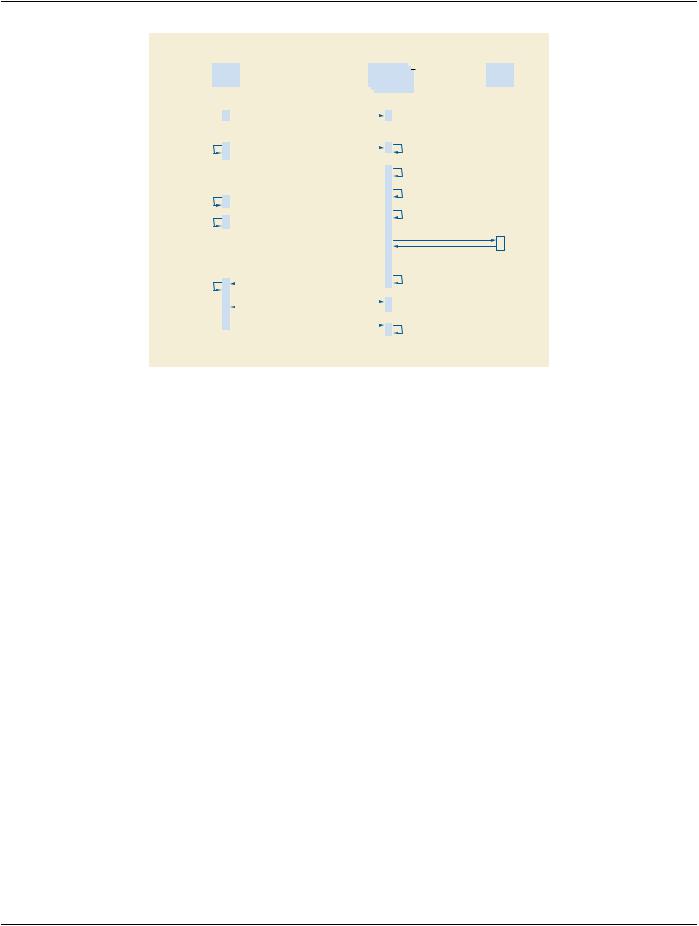
In a second example, the User monitors progress from another User Terminal ("Watcher") and decides to request cancellation after​ 3 beams.​

User


User Control


Dose Calculation

Terminal


Console


System


Display Progress “Beam 2 of 5”

Display Progress “Beam 3 of 5”

User decides to cancel

Display Result

“Task X Canceled”

Find UPS Task of Interest (C-FIND)

Subscribe for Task X (N-ACTION SUBSCRIBE)

Report Task X Current Status (N-EVENT)

Report Task X Progress (N-EVENT)

Display Progress

“Beam 3 of 5”

Request Task X Cancel (N-ACTION CANCEL REQUEST)

“Beam 3 of 5”

Report Task X Canceled Requested (N-EVENT)

Report Task X Canceled (N-EVENT)

Retrieve Final State Details (N-GET)

UnSubscribe for Task X (N-ACTION SUBSCRIBE [Task X])

...

Add Terminal to Task X

Subscriber List

Update Task X UPS Progress to “Beam 3 of 5”

Decide Canceling Task X is feasible and agreeable

Update Task X Details

Update Task X UPS

Status to CANCELED

Delete Task X

Figure GGG.5-2. Diagram of Remote Monitoring and Cancel​

GGG.2.6 X-Ray Clinic Push Workflow​

In this example, arriving patients are admitted at the RIS and sent to a specific X-Ray room for their exam.​

The RIS is shown here subscribing globally for events from each Room. Alternatively the RIS could subscribe individually to each​ Task right after the N-CREATE is requested.​

It is left open whether the patient demographics have been previously registered and the patients scheduled on the RIS or whether​ they are registered on the RIS when they arrive.​

- Standard -​

DICOM PS3.17 2020a - Explanatory Information​

Page 569​


RIS


X-RAY


PACS


(Room #1)


Subscribe globally for events


(N-ACTION SUBSCRIBE [Well-Known Instance])


...


Patient (Mr. X) arrives


at Reception


RIS assigns Mr. X


Create UPS for Task X


to Room 1


Add UPS Task (N-CREATE)


Tech confirms identity of Mr. X


Patient (Mr. X) arrives at X-Ray Room 1


and begins procedure


Report Task X In-Progress (N-EVENT)


Update Task X UPS Status to


Display Progress


IN-PROGRESS


“Exam Started”


Display Progress


Report Task X Progress (N-EVENT)


Update Task X UPS Progress to


“All Views Taken”


“All Views Taken”


Store Images


Update Task X Details


Display Progress


Report Task X Complete (N-EVENT)


Update Task X UPS Status to


COMPLETE


“Exam Complete”


Retrieve Final State Details (N-GET)


UnSubscribe for Task X


(N-ACTION SUBSCRIBE [Task X])


Delete Task X


Figure GGG.6-1. Diagram of X-Ray Clinic Push Workflow​

GGG.2.7 Other Examples​

AwidevarietyofworkflowmethodsarepossibleusingtheUPSSOPClasses.Inadditiontothosediagrammedintheprevioussections,​ a few more are briefly described here. These include examples of ways to handle unscheduled tasks, grouped tasks, append cases,​ "event forwarding", etc.​

Self-Scheduling Push & Pull: Unscheduled and Append Cases​

Inradiationtherapyapreviouslyunscheduled("emergency")proceduremaybeperformedonaTreatmentDeliverySystem.Normally​ a TDS performs scheduled procedures as a Performing SCU in a Typical Pull Workflow like that shown in GGG.2.2. A TDS that might​ needtoperformunscheduledprocedurescouldadditionallyimplementUPSPush(asanSCU)andpushthe"unscheduled"procedure​ to the departmental worklist server then immediately set it IN PROGRESS as a UPS Pull SCU. The initial Push to the departmental​ server allows the rest of the departmental workflow to "sync up" normally to the new task on the schedule.​

A modality choosing to append some additional images after the original UPS was completed could use a similar method. Since the​ original UPS can no longer be modified, the modality could push a new UPS instance to the Worklist Manager and then immediately​ set it IN PROGRESS. Many of the Attribute values in the new UPS would be the same as the original UPS.​

Note that for a Pull Performer that wants to handle unscheduled cases, this Push & Pull approach is pretty simple to implement. Be-​ comingaUPSPushSCUjustrequiresN-CREATEandN-ACTION(RequestCancel)thatarequitesimilartotheN-SETandN-ACTION​ it already supports as a UPS Pull SCU.​

The alternative would be implementing both UPS Watch and UPS Event as an SCP, which would be more work. Further, potential​ listeners would have to be aware of and monitor the performing system to track the unscheduled steps, instead of just monitoring the​ departmental Pull SCP.​

Self-Scheduling Performer​

An example of an alternative method for handling unscheduled procedures is a CAD workstation that decides for itself to perform​ processingonastudy.ByimplementingUPSWatchasanSCPandUPSEventasanSCP,theworkstationcancreateUPSinstances​ internally and departmental systems such as the RIS can subscribe globally to the workstation to monitor its activities.​

The workstation might create the UPS tasks in response to having data pushed to it, or potentially the workstation could itself also​ be a Watch and Event SCU and subscribe globally to relevant modality or PACS systems and watch for appropriate studies.​

- Standard -​

Page 570​

DICOM PS3.17 2020a - Explanatory Information​

Push Daisy Chain​

Sometimes the performer of the current task is in the best position to decide what the next task should be.​

An alternative to centralized task management is daisy-chaining where each system pushes the next task to the next performer upon​ completion of the current task. Using a workflow similar to the X-Ray Clinic example in GGG.6, a modality could push a task to a CAD​ workstation to process the images created by the modality. The task would specify the necessary images and perhaps parameters​ relevant to the acquisition technique. The RIS could subscribe globally with the CAD workstation to track events. Another example​ of push daisy chain would be for the task completed at each step in a reporting process to be followed by scheduling the next logical​ task.​

Hand-offs, Fail-overs and Putting Tasks Back on the Worklist​

Sometimes the performer of the current task, after setting it to IN PROGRESS, may determine it cannot complete the task and would​ like the task performed by another system. It is not permitted to move the task backwards to the SCHEDULED state.​

One approach is for the performer to cancel the old UPS and schedule a new UPS to be pulled off the worklist by another system or​ by itself at some point in the future. The new UPS would be populated with details from the original. The details of the new UPS, such​ astheInputInformationSequence(0040,4021),theScheduledWorkitemCodeSequence(0040,4018),andtheScheduledProcessing​ Parameters Sequence (0074,1210), might be revised to reflect any work already completed in the old UPS. By including the "Discon-​ tinued Procedure Step rescheduled" code in the Procedure Step Discontinuation Reason Code Sequence (0074,100e) of the old​ UPS,theperformercanallowwatchersandothersystemsmonitoringthetasktoknowthatthereisareplacementfortheoldcanceled​ UPS. By referencing the UID of the old UPS in the Replaced Procedure Step Sequence (0074,1224) of the new UPS, the performer​ can allow watchers and other systems to find the new UPS that replaced the old. A proactive SCP might even subscribe watchers of​ the old UPS to the new UPS that replaces it.​

Alternatively, if the performer does not have the capability to create a new UPS, it could include the "Discontinued Procedure Step​ rescheduling recommended" code in the Procedure Step Discontinuation Reason Code Sequence (0074,100e). A very smart​ scheduling system could observe the cancellation reason and create the new replacement UPS as described above on behalf of the​ performer.​

Another approach is for the performer to "sub-contract" to another system by pushing a new UPS onto that system and marking the​ original UPS complete after the sub-contractor finishes.​

Yet another approach would be for the performer to deliver the Locking UID (by some unspecified mechanism) to another system​ allowing the new system to continue the work on the existing UPS. Coordination and reconciliation would be very important since the​ new system would need to review the current contents of the UPS, understand the current state, update the performing system in-​ formation, etc.​

GGG.3 Other Features​

GGG.3.1 What Was Scheduled Vs. What Was Performed​

The performing system for a UPS instance determines what details to put in the Attributes of the Performed Procedure Information​ Module. It is possible that the procedure performed may differ in some details from the procedure scheduled. It is up to the performing​ system to decide how much the performed procedure can differ from the scheduled procedure before it is considered a different​ procedure, or how much must be performed before the procedure is considered complete.​

In the case of cancellation, it is possible that some details of the situation may be indeterminable. Beyond meeting the Final State​ requirements,accuratelyreflectingintheCANCELEDUPSinstancetheactualstateofthetask(e.g.,reflectingpartialworkcompleted​ and/or any cleanup performed during cancellation), is at the discretion of the performing system.​

In general it is expected that:​

•​AnSCUthatcompletesaUPSdifferentlythandescribedinthescheduleddetails,butaccomplishestheintendedgoal,wouldrecord​ the details as performed in the existing UPS and set it to COMPLETED. Interested systems may choose to N-GET the Performed​ Codes from the UPS and confirm whether they match the Scheduled Codes.​

•​An SCU that completes part of the work described in a UPS, but does not accomplish the intended goal, would set the Performed​ Protocol Codes to reflect what work was fully or partially completed, set the Output Sequence to reflect the created objects and set​ the UPS state to CANCELED since the goal was not completed.​

- Standard -​

Источник: https://studfile.net/preview/14585770/