Материал: part17

Внимание! Если размещение файла нарушает Ваши авторские права, то обязательно сообщите нам

DICOM PS3.17 2020a - Explanatory Information​

Page 591​

</request>

<response status="200">

<param name="Warning" style="header"

fixed="299 {SERVICE}: The fuzzymatching parameter is not supported. Only literal matching has been performed." />

<representation mediaType="multipart/related; type=application/dicom+xml" /> <representation mediaType="application/dicom+json" />

</response>

<response status="400 401 403 413 503" /> </method>

<resource path="{SeriesInstanceUID}"> <resource path="instances">

<method name="GET" id="SearchForSeriesInstances"> <request>

<param name="Accept" style="header" default="type=application/dicom+json">

<option value="multipart/related; type=application/dicom+xml" /> <option value="application/dicom+json" />

</param>

<param name="Cache-control" style="header"> <option value="no-cache" />

</param>

<param name="limit" style="query" /> <param name="offset" style="query" />

<param name="SOPClassUID" style="query" repeating="true" /> <param name="00080016" style="query" repeating="true" /> <param name="SOPInstanceUID" style="query" repeating="true" /> <param name="00080018" style="query" repeating="true" /> <param name="InstanceNumber" style="query" />

<param name="00200013" style="query" />

<param name="includefield" style="query" repeating="true"> <option value="all" />

</param>

</request>

<response status="200">

<param name="Warning" style="header"

fixed="299 {SERVICE}: The fuzzymatching parameter is not supported. Only literal matching has been performed." />

<representation mediaType="application/dicom+json" />

<representation mediaType="multipart/related; type=application/dicom+xml" /> </response>

<response status="400 401 403 413 503" /> </method>

</resource>

</resource>

</resource>

<resource path="instances">

<method name="GET" id="SearchForInstances"> <request>

<param name="Accept" style="header" application/dicom+json">

<option value="multipart/related; type=application/dicom+xml" /> <option value="application/dicom+json" />

</param>

<param name="Cache-control" style="header"> <option value="no-cache" />

</param>

<param name="limit" style="query" /> <param name="offset" style="query" />

<param name="SOPClassUID" style="query" repeating="true" />

- Standard -​

Page 592​

DICOM PS3.17 2020a - Explanatory Information​

<param name="00080016" style="query" repeating="true" /> <param name="SOPInstanceUID" style="query" repeating="true" /> <param name="00080018" style="query" repeating="true" /> <param name="StudyDate" style="query" />

<param name="00080020" style="query" /> <param name="StudyTime" style="query" /> <param name="00080030" style="query" /> <param name="AccessionNumber" style="query" /> <param name="00080050" style="query" /> <param name="Modality" style="query" /> <param name="00080060" style="query" />

<param name="ModalitiesInStudy" style="query" /> <param name="00080061" style="query" />

<param name="ReferringPhysicianName" style="query" /> <param name="00080090" style="query" />

<param name="PatientName" style="query" /> <param name="00100010" style="query" /> <param name="PatientID" style="query" /> <param name="00100020" style="query" />

<param name="StudyInstanceUID" style="query" repeating="true" /> <param name="0020000D" style="query" repeating="true" />

<param name="SeriesInstanceUID" style="query" repeating="true" /> <param name="0020000E" style="query" repeating="true" />

<param name="SeriesNumber" style="query" /> <param name="00200011" style="query" /> <param name="InstanceNumber" style="query" /> <param name="00200013" style="query" />

<param name="PerformedProcedureStepStartDate" style="query" /> <param name="00400244" style="query" />

<param name="PerformedProcedureStepStartTime" style="query" /> <param name="00400245" style="query" />

<param name="RequestAttributeSequence" style="query" /> <param name="00400275" style="query" />

<param name="RequestAttributeSequence.ScheduledProcedureStepID" style="query" /> <param name="00400275.00400009" style="query" />

<param name="RequestAttributeSequence.RequestedProcedureID" style="query" /> <param name="00400275.00401001" style="query" />

<param name="includefield" style="query" repeating="true"> <option value="all" />

</param>

</request>

<response status="200">

<param name="Warning" style="header"

fixed="299 {SERVICE}: The fuzzymatching parameter is not supported. Only literal matching has been performed." />

<representation mediaType="multipart/related; type=application/dicom+xml" /> <representation mediaType="application/dicom+json" />

</response>

<response status="400 401 403 413 503" /> </method>

</resource>

<resource path="{BulkDataURL}">

<method name="GET" id="RetrieveBulkData"> <request>

<param name="Accept" style="header"

default="multipart/related; type=application/octet-stream"> <option value="multipart/related; type=application/octet-stream" /> </param>

</request>

<response status="200">

- Standard -​

DICOM PS3.17 2020a - Explanatory Information​

Page 593​

<representation mediaType="multipart/related; type=application/octet-stream" /> </response>

<response status="400 404 406 410 503"></response> </method>

</resource>

</resources>

</application>

- Standard -​

Page 594​

DICOM PS3.17 2020a - Explanatory Information​

- Standard -​

DICOM PS3.17 2020a - Explanatory Information​

Page 595​

III Ophthalmic Thickness Map Use Cases​ (Informative)​

III.1 Introduction​

Several ophthalmic devices produce thickness and/or height measurements of certain anatomical features of the posterior eye (e.g.,​ opticnerveheadtopography,retinalthicknessmap,etc.).Themeasurementsaremappedtopographicallyasmonochromaticimages​ with pseudo color maps, and used extensively for diagnostic purposes by clinicians.​

III.2 Macular Retinal Thickness Example​

Quantitative ophthalmic OCT image analysis provides essential thickness measurement data of the retina. In the clinical practice two​ thicknessparametersarecommonlyused:totalretinalthickness(TR)inmacularregionandretinalnervefiberlayerthickness(RNFL)​ in optic nerve head (ONH) region. TR is widely applied to assess various retinal pathologies involving macula (e.g., cystoid macular​ edema, age-related macular degeneration, macular hole, etc.). The RNFL thickness measurement is most commonly used for​ glaucoma assessment.​

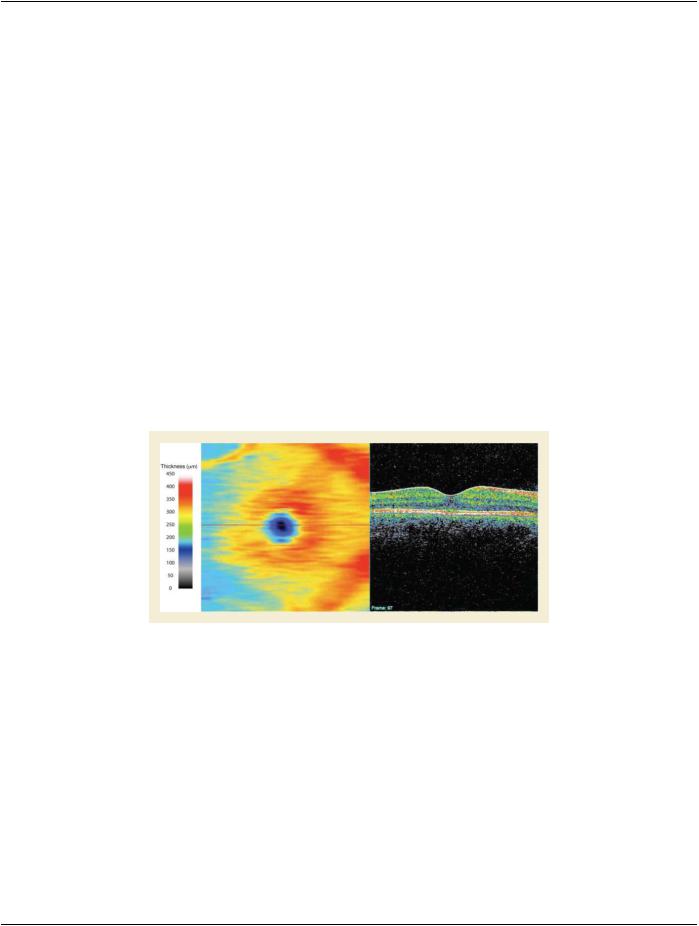
Figure III.2-1 is an example of 2D TR map computed on a 3D OCT cube data from a healthy eye. The color bar on the left provides​ a color-to-thickness representation to allow interpretation of the false color coded 2D thickness map in the middle. The image on the​ right shows one OCT frame representing a retinal cross section along the red line (across the middle of the thickness map). TR is​ defined as the thickness between internal limiting membrane (white line on the OCT frame on the right) and RPE/Choroid interface​ (blue line on the OCT frame). These two borders are automatically detected using a segmentation algorithm applied to the entire 3D​ volume.​

Figure III.2-1. Macular Example Mapping​

III.3 RNFL Example​

Figure III.3-1 is an example of a 2D RNFL map computed on a 3D OCT cube data from a healthy eye. The figure layout is the same​ as the previous example. The RNFL thickness is limited to the thickness of this single layer of the retina that is comprised of the​ ganglion cell axons that course to the optic nerve head and exit the eye as the optic nerve. Note that this image depicts a BMP mask​ in the center of the map where the optic nerve head (ONH) exists and no RNFL measurements can be obtained. In this example, the​ mask is displayed as a black area, which does not contain any thickness information (not zero micron thickness). Since the color bar​ representation is not relevant at the ONH, common practice is to mask it to avoid confusion or misinterpretation due to meaningless​ thickness data in this area.​

- Standard -​

Источник: https://studfile.net/preview/14585770/