Материал: part17

Внимание! Если размещение файла нарушает Ваши авторские права, то обязательно сообщите нам

DICOM PS3.17 2020a - Explanatory Information​

Page 751​

XXX.3.7.3 Encoding Details​

XXX.3.7.3.1 Volumetric Presentation State Relationship Module Recommendations​

Table XXX.3.7-1. Volumetric Presentation State Relationship Module Recommendations​

Attribute Name​


Tag​

Comment​

VolumetricPresentationStateInputSequence​

(0070,1201)​

Two items are this sequence referencing one​


volume for each data type​

>ITEM 1​


>Volumetric Presentation Input Number​


(0070,1207)​

Set to 1​

>Presentation Input Type​


(0070,1202)​

Set to "VOLUME".​

>Referenced Image Sequence​


(0008,1140)​

Sequence of frames with Data Type (0018,9808)​


value of TISSUE_INTENSITY​

>>Table 10-3 “Image SOP Instance Reference Macro Attributes” in PS3.3​


>Crop​


(0070,1204)​

Set to "NO".​

>ITEM 2​


>Volumetric Presentation Input Number​


(0070,1207)​

Set to 2​

>Presentation Input Type​


(0070,1202)​

Set to "VOLUME".​

>Referenced Image Sequence​


(0008,1140)​

Sequence of frames with Data Type (0018,9808)​


value of FLOW_VELOCITY​

>>Table 10-3 “Image SOP Instance Reference Macro Attributes” in PS3.3​


>Crop​


(0070,1204)​

Set to "NO".​

XXX.3.7.3.2 Presentation View Description Module Recommendations​

Table XXX.3.7-2. Presentation View Description Module Recommendations​

Attribute Name​

Tag​


Comment​

Anatomic Region Sequence​

(0008,2218)​

Set to (80891009, SCT, "Heart")​

View Code Sequence​

(0054,0220)​

Set to the code triplet for the view.​


Typical coded values:​

(399214001, SCT, "Apical four chamber")​ (399232001, SCT, "Apical two chamber")​ (443698002, SCT, "Transesophageal short axis view")​

XXX.3.7.3.3 Multi-Planar Reconstruction Geometry Module Recommendations​

Table XXX.3.7-3. Multi-Planar Reconstruction Geometry Module Recommendations​

Attribute Name​

Tag​

Comment​

Multi-Planar Reconstruction Style​

(0070,1501)​

Set to PLANAR​

MPR Thickness Type​

(0070,1502)​

Set to THIN​

MPR View Width Direction​

(0070,1507)​

Set to the direction of the top row of the MPR view in the​


VPC-RCS​

MPR View Width​

(0070,1508)​

Set to the width of the top row of the MPR view in the​


VPC-RCS​

- Standard -​

Page 752​

DICOM PS3.17 2020a - Explanatory Information​

Attribute Name​

Tag​

Comment​

MPR View Height Direction​

(0070,1511)​

Set to the direction of the leftmost column of the MPR view​


in the VPC-RCS​

MPR View Height​

(0070,1512)​

Set to the width of the leftmost column of the MPR view in​


the VPC-RCS​

MPR Top Left Hand Corner​

(0070,1505)​

Settoan(x,y,z)pointintheVPC-RCSoftheupperleftcorner​


of the MPR view​

XXX.3.7.3.4 Volumetric Presentation State Display Module Recommendations​

Table XXX.3.7-4. Volumetric Presentation State Display Module Recommendations​

Attribute Name​

Tag​

Comment​

Pixel Presentation​

(0008,9205)​

Set to "TRUE_COLOR"​

Presentation State Classification​

(0070,1801)​

Contains two items, one for each classification component.​

Component Sequence​


>ITEM 1​


>Component Type​

(0070,1802)​

Set to "ONE_TO_RGBA"​

>Component Input Sequence​

(0070,1803)​

Only one item in this sequence since the component has only​


one input.​

>>Input Set Index​

(0070,1804)​

Set to "1" for the MPR slice of the TISSUE_INTENSITY data​

>RGB LUT Transfer Function​

(0028,140F)​

Set to "EQUAL_RGB" to map to grayscale RGB values.​

>Alpha LUT Transfer Function​

(0028,1410)​

Set to "IDENTITY"​

>ITEM 2​


>Component Type​

(0070,1802)​

Set to "ONE_TO_RGBA"​

>Component Input Sequence​

(0070,1803)​

Only one item in this sequence since the component has only​


one input.​

>>Input Set Index​

(0070,1804)​

Set to "2" for the MPR slice of the FLOW_VELOCITY data​

>RGB LUT Transfer Function​

(0028,140F)​

Set to "TABLE" to be able to map to colors representing the flow​


velocities towards and away from the ultrasound transducer​

>Alpha LUT Transfer Function​

(0028,1410)​

Set to "IDENTITY"​

…​


Definitions of lookup tables left out for brevity.​

Presentation State Compositor​

(0070,1805)​

Set to one item that defines the threshold compositing of the two​

Component Sequence​


data types​

>WeightingTransferFunctionSequence​

(0070,1806)​

ContainsthetwoWeightingLUTsfromSectionXXX.5.4tocreate​


the threshold composting from two RGBA inputs:​


•​IfthemagnitudeoftheFLOW_VELOCITYinputisgreaterthan​


the magnitude of the TISSUE_INTENSITY input, display the​


MPR of the FLOW_VELOCITY data.​


•​Otherwise, display the MPR of the TISSUE_INTENSITY data​

…​


Definitions of lookup tables left out for brevity.​

ICC Profile​

(0028,2000)​

SettoanICCProfiledescribingthetransformationoftheresulting​


RGB image into PCS-Values.​

- Standard -​

DICOM PS3.17 2020a - Explanatory Information​

Page 753​

XXX.3.8 Blending with Functional Data, e.g., PET/CT or Perfusion Data​

XXX.3.8.1 User Scenario​

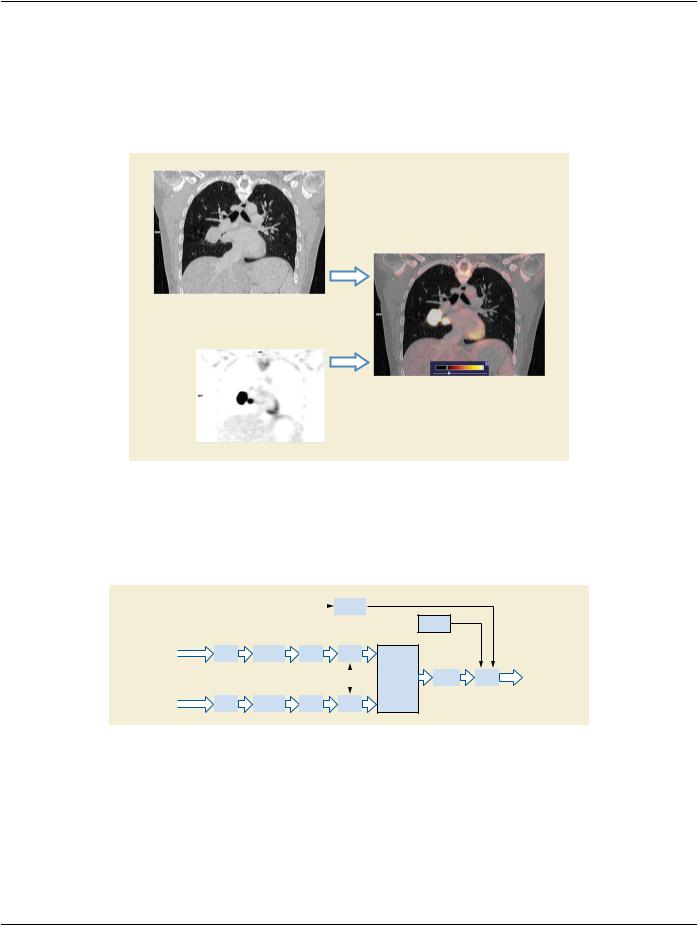
To aid in the exact localization of functional data, e.g., the accumulation of a radioactive tracer which is measured with a position​ emissiontomography(PET)scan,thecolorizedfunctionaldataisblendedwithe.g.,aCTscanwhichshowsthecorrespondinganatomy​ in detail.​

CT Image

Blended Image

PET Image

Figure XXX.3.8-1. Blending with Functional Data​

XXX.3.8.2 Encoding Outline​

To create a Planar MPR view which shows the colorized PET data blended with the grayscale CT data the Planar MPR VPS IOD in-​ stance defines via the Volumetric Presentation State Display Module a volumetric pipeline with 2 inputs.​

Volume graphics input


MPR and


Projection


CT Data

VOI LUT


Spatial


Cropping


MPR


Registration


MPR Geometry


PET Data

VOI LUT


Spatial


Cropping


MPR


Registration


Graphic

Annotation

Volumetric

PCS


Graphics

PCS

Presentation

Transform


Layer

State Display


Figure XXX.3.8-2. Planar MPR VPS Pipeline for PET/CT Blending​

ThefirstinputtotheVolumetricPresentationState(VPS)Displaypipelineprovidesthe MPRviewoftheanatomyinthe display,which​ will be left as grayscale in the VPS Display pipeline. This will provide the backdrop to the colorized PET input to be subsequently​ overlaid in the second stage of the VPS pipeline.​

SincePETandCTdatasetsusuallyhavedifferentresolutionsandarenotaligned(eveniftheyreferencethesameFrameofReference​ IODinstance)thedatasetsarespatiallyregisteredtotheVolumetricPresentationStateRCS.Fromtheseregisteredvolumesgrayscale​ Planar MPRs are generated using the same MPR geometry.​

- Standard -​

Page 754​

DICOM PS3.17 2020a - Explanatory Information​

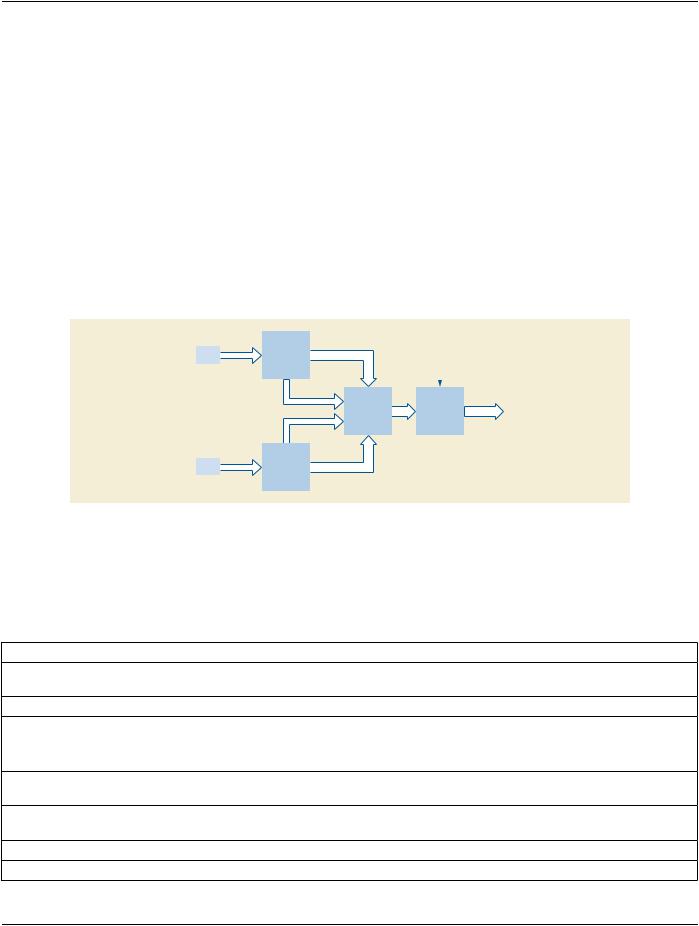
TheVolumePresentationStateDisplaypipelinethenblendstheMPRsintooneview(seeSectionFF.2.3.2.1“ClassificationComponent​

Components” in PS3.4).​

IntheVolumetricPresentationStateDisplayModulethePresentationStateClassificationComponentSequence(0070,1801)defines​ classification components for mapping the MPRs to RGBA.​

The first MPR (CT) view is mapped to grayscale RGBA by an EQUAL_RGB RGB LUT Transfer Function (0028,140F). Alpha LUT​ Transfer Function (0028,1410) is set to NONE, since the anatomy will be rendered as completely opaque background.​

For the second MPR (functional, PET) view an RGBA transfer function maps the tracer intensity values to a color range. Alpha-2 is​ set to 0 for black pixels, making them completely transparent. Alpha-2 for all other pixels is set to a single value between 0 and 1,​ depending on the intended transparency of the functional data.​

It is envisioned that display applications provide mechanisms to the user for manipulating the Alpha-2 value which has been set in​ the Presentation State, thereby allowing the user to control the visibility of the anatomy vs. the functional data.​

TheRGBCompositorthenperforms"PartiallyTransparentAoverB"compositingasdescribedinSectionXXX.5.2bypassingthrough​

Alpha-2 as Weight-2 and (1- Alpha-2) as Weight-1​

Figure XXX.3.8-3 shows details of the classification and compositing for the blended PET/CT Planar MPR.​


One Input


CT

Scalar value


RGB-1


MPR

RBGA

ICC Input Profile


(EQUAL_RGB)


Alpha-1

RGB Compositor


Profile


Connection


(one minus Alpha-2

RGB

PCS-Values


Space


weighting)


Transform


Alpha-2


One Input


PET

Scalar value


RGB-2


MPR


RBGA


Figure XXX.3.8-3. PET/CT Classification and Compositing Details​

XXX.3.8.3 Encoding Details​

XXX.3.8.3.1 Volumetric Presentation State Relationship Module Recommendations​

Table XXX.3.8-1. Volumetric Presentation State Relationship Module Recommendations​

Attribute Name​

Tag​

Comment​

Volumetric Presentation State Input​

(0070,1201)​

Contains two items: one for the CT volume input and one​

Sequence​


for the PET volume input.​

>ITEM 1​


>Presentation Input Type​

(0070,1202)​

Set to "VOLUME".​

>Referenced Image Sequence​

(0008,1140)​

Set reference(s) to the image(s) that make(s) up the CT​


input volume.​

>Referenced Spatial Registration​

(0070,0404)​

Set to reference the Spatial Registration instance which​

Sequence​


registers the CT input to the VPS RCS.​

>Window Center​

(0028,1050)​

Set either Window Center and Window Width or VOI LUT​


Sequence (0028,3010).​

>Window Width​

(0028,1051)​


>Crop​

(0070,1204)​

Set to "NO".​

- Standard -​

DICOM PS3.17 2020a - Explanatory Information​

Page 755​

Attribute Name​

Tag​

Comment​


>ITEM 2​


>Presentation Input Type​

(0070,1202)​

Set to "VOLUME".​


>Referenced Image Sequence​

(0008,1140)​

Set reference(s) to the image(s) that make(s) up the PET​


input volume.​


>Referenced Spatial Registration​

(0070,0404)​

Set reference to the Spatial Registration instance which​

Sequence​


registers the PET input to the VPS RCS.​


>Window Center​

(0028,1050)​

Set either Window Center and Window Width or VOI LUT​


Sequence (0028,3010).​


>Window Width​

(0028,1051)​


>Crop​

(0070,1204)​

Set to "NO".​


XXX.3.8.2.3 Volumetric Presentation State Display Module Recommendations​


Table XXX.3.8-3. Volumetric Presentation State Display Module Recommendations​


Attribute Name​

Tag​

Comment​


Pixel Presentation​

(0008,9205)​

Set to "TRUE_COLOR"​


Presentation State Classification​

(0070,1801)​

Contains two items, one for classifying the CT data and one​

Component Sequence​


for classifying the PET data.​


>ITEM 1​


>Component Type​

(0070,1802)​

Set to "ONE_TO_RGBA"​


>Component Input Sequence​

(0070,1803)​

Contains one item in this sequence since the component has​


only one input.​


>>Input Set Index​

(0070,1804)​

Set to "1" for the anatomy view.​


>RGB LUT Transfer Function​

(0028,140F)​

Set to "EQUAL_RGB" to map to grayscale RGB values.​

>Alpha LUT Transfer Function​

(0028,1410)​

Set to "NONE". The anatomy is completely opaque.​

>ITEM 2​


>Component Type​

(0070,1802)​

Set to "ONE_TO_RGBA"​


>Component Input Sequence​

(0070,1803)​

Contains one item in this sequence since the component has​


only one input.​


>>Input Set Index​

(0070,1804)​

Set to "2" for the functional view.​


>RGB LUT Transfer Function​

(0028,140F)​

Set to "TABLE" to be able to map functional data to a color​


range.​


>Alpha LUT Transfer Function​

(0028,1410)​

Set to "TABLE" to be able to set a transparency for the​


segmentation.​


…​


Definitions of lookup tables left out for brevity.​


PresentationStateCompositorSequence​

(0070,1805)​

Contains one item​


>Weighting Transfer Function Sequence​

(0070,1806)​

Contains the two Weighting LUTs from Section XXX.5.2 to​


createthe"PartiallyTransparentAoverB"compostingoftwo​


RGBA inputs.​


…​


Definitions of lookup tables left out for brevity.​


ICC Profile​

(0028,2000)​

Set to an ICC Profile describing the transformation of the​


resulting RGB image into PCS-Values.​


- Standard -​

Источник: https://studfile.net/preview/14585770/