Материал: part17

Внимание! Если размещение файла нарушает Ваши авторские права, то обязательно сообщите нам

Page 956​


DICOM PS3.17 2020a - Explanatory Information​


V

A

M

V

A

V

A


...


V

A

V

V


V

...

V

A

M

V

A

V

A


...


V

A

V

V


V

...


Frame n


Frame n+1


Time

time t

time t + (1/60)s

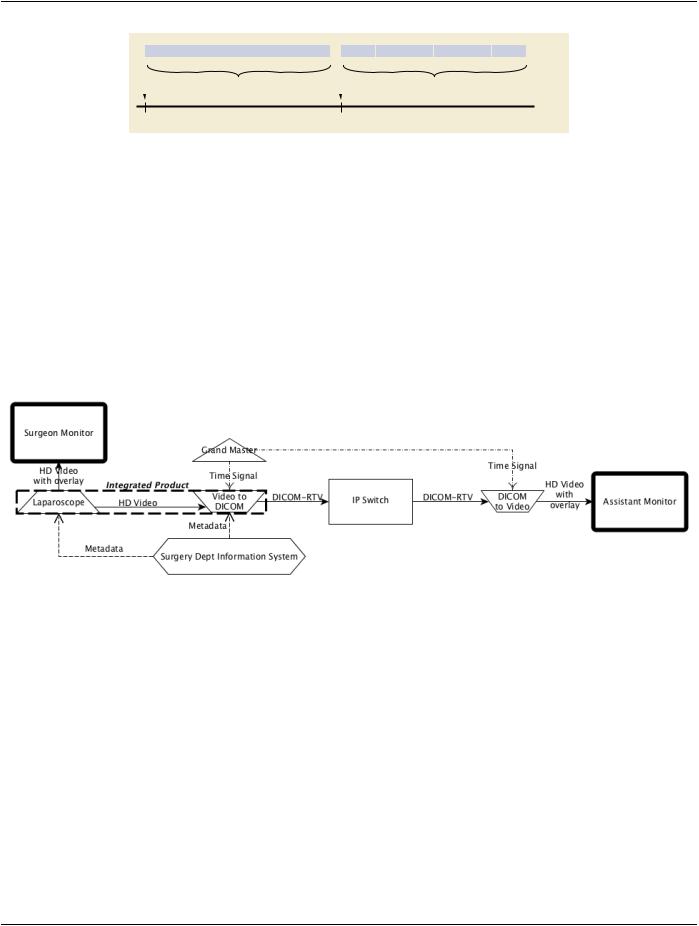
Figure PPPP.1-3. Real-Time Video transmission details​

PPPP.2 Use Case: Duplicating Video On Additional Monitors​

In the context of image guided surgery, two operators are directly contributing to the procedure:​

•​a surgeon performing the operation itself, using relevant instruments;​

•​an assistant controlling the imaging system (e.g., laparoscope).​

In some situations, both operators cannot stand on the same side of the patient. Because the control image has to be in front of each​ operator, two monitors are required, a primary one, directly connected to the imaging system, and the second one on the other side​ of the patient.​

Additionaloperators(e.g.,surgerynurse)mightalsohavetoseewhatishappeningonadditionalmonitorsinordertoanticipateactions​ (e.g., providing instrument).​

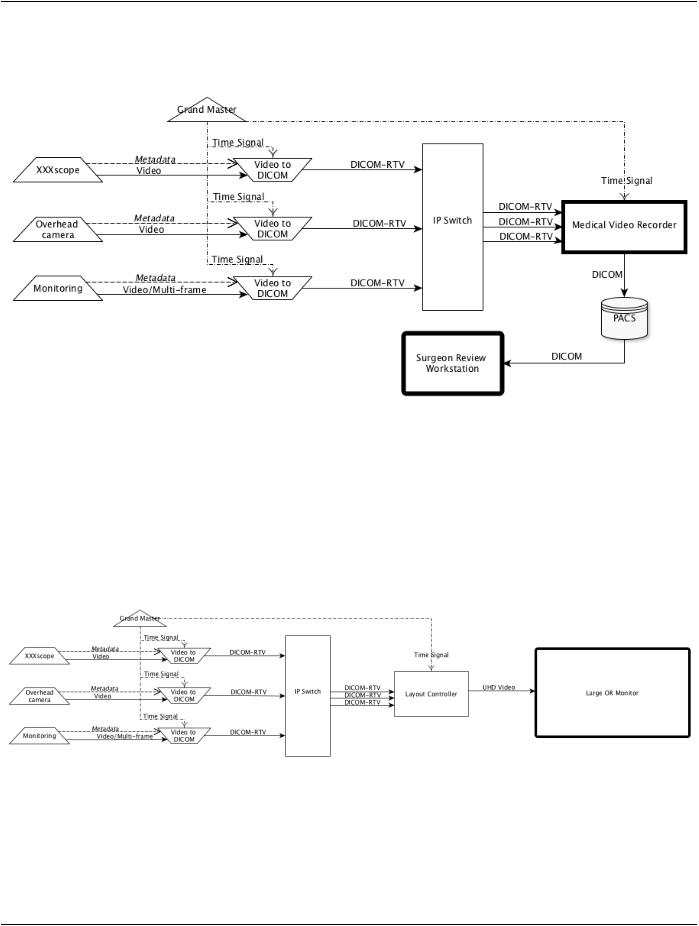
Figure PPPP.2-1. Duplicating on additional monitor​

Thelivevideoimagehastobetransferredtoadditionalmonitorswithaminimallatency,withoutmodifyingtheimageitself(resolution…).​ The latency between the two monitors (see Figure PPPP.2-1) should be compatible with collaborative activity for surgery where the​ surgeon is, for example, operating based on the primary monitor and the assistant is controlling the endoscope based on the second​ monitor. All equipment is synchronized with the Grand Master. The DICOM-RTV generation capability might be either an integrated​ part of the laparoscope product, or the laparoscope might send an HD video signal to the DICOM-RTV generator (Video-to-DICOM​ converter on the Figure PPPP.2-1). It is important that the converter be able to send video with or without a metadata overlay to the​ assistant monitor. This supplement addresses only the communication aspects, not the presentation.​

PPPP.3 Use Case: Post Review by Senior​

A junior surgeon performs a procedure which apparently goes well. The next day, the patient experiences a complication requiring​ the surgeon to refer the patient to a senior surgeon.​

In order to decide what to do, the senior surgeon:​

•​reviews and understands what happened;​

•​takes the decision to re-operate on the patient or not;​

- Standard -​

DICOM PS3.17 2020a - Explanatory Information​

Page 957​

•​accesses the videos of the first operation, if a new operation is performed.​

Moreover, the junior surgeon has to review her/his own work in order to prevent against a new mistake.​

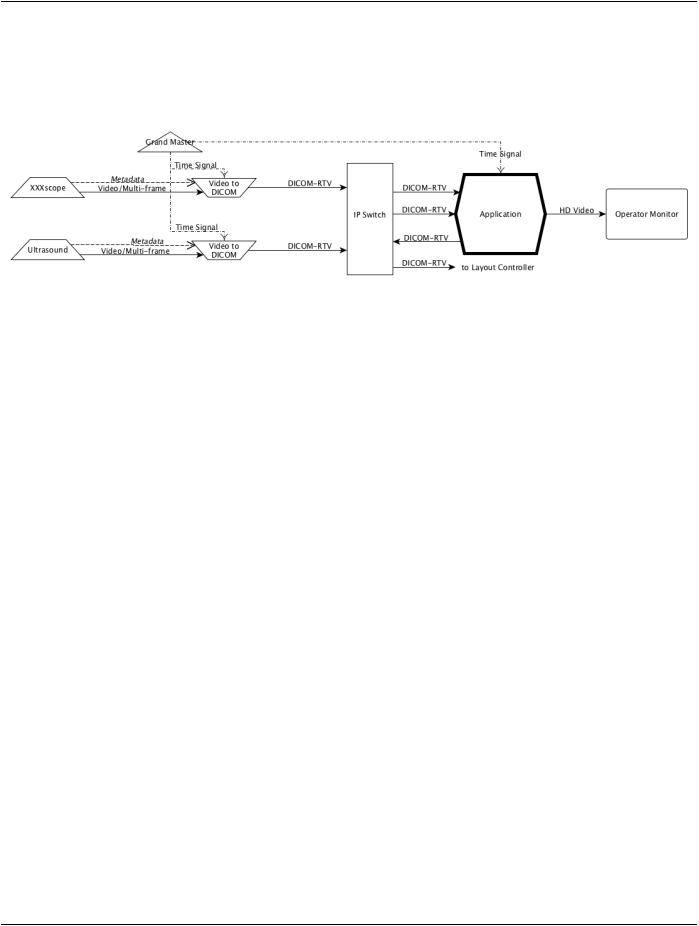
Figure PPPP.3-1. Recording multiple video sources​

A good quality recording of video needs to be kept, at least for a certain duration, including all the video information (endoscopy,​ overhead, monitoring, …) and associated metadata from the surgery (see Figure PPPP.3-1). In this case, the metadata is coming​ directly from each device.. The recording has to maintain time consistency between the different video channels. Section PPPP.8.1​ describes how the video could be captured and stored as a DICOM IOD using the present DICOM Store Service, as shown in Fig-​ ure PPPP.3-1, however the video could also be stored in another format. Such IODs could be retrieved and displayed using conven-​ tional DICOM workstation as shown in Figure PPPP.3-1. They could also be played back using DICOM-RTV as described in section​ PPPP.8.2.​

PPPP.4 Use Case: Automatic Display in Operating Room (or)​

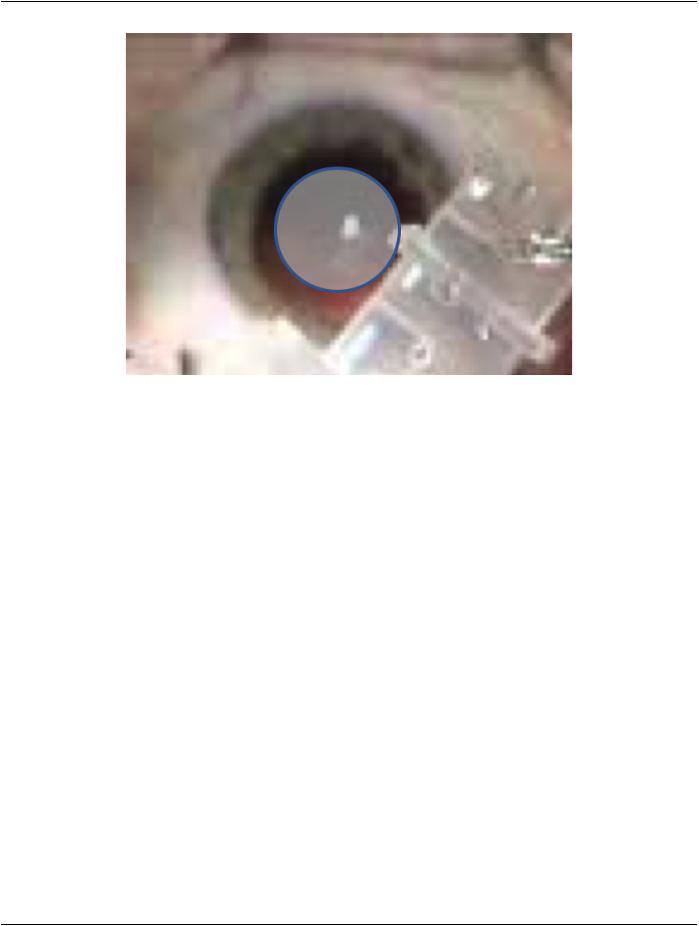
Figure PPPP.4-1. Displaying multiple source on one unique monitor​

SomeORshavelargemonitorsdisplayingavarietyofnecessaryinformation.Dependingonthestageoftheprocedure,theinformation​ to display changes. To improve the quality of the real-time information shared inside the OR, it is relevant to automate the changes​ of layout and content of such a display, based on the metadata conveyed along with the video (e.g., displaying the endoscope image​ only when the endoscope is inside the patient body).​

- Standard -​

Page 958​

DICOM PS3.17 2020a - Explanatory Information​

All the video streams have to be transferred with the relevant metadata (patient, study, equipment…) , as shown in Figure PPPP.4-​ 1. Mechanisms to select and execute the layout of images on the large monitor are not defined. Only the method for conveying the​ multiple synchronized videos along with the metadata, used as parameters for controlling the layout, is specified.​

PPPP.5 Use Case: Augmented Reality​

Figure PPPP.5-1. Application combining multiple real-time video sources​

For image guided surgery, Augmented Reality (AR) applications enrich the live images by adding information as overlay, either 3D​ display of patient anatomy reconstructed from MR or CT scans, or 3D projections of other real-time medical imaging (3D ultrasound​ typically). In the second case, display devices (glasses, tablets…) show a real-time "combination" image merging the primary live​ imaging (endoscopy, overhead, microscopy…) and the real-time secondary live imaging (ultrasound, X-Ray…). The real-time​ "combination" image could also be exported as a new video source, through the DICOM Real-Time Video protocol.​

All video streams have to be transferred with ultra-low latency and very strict synchronization between frames (see Figure PPPP.5-​ 1). Metadata associated with the video has to be updated at the frame rate (e.g., 3D position of the US probe). The mechanisms used​ for generating augmented reality views or to detect and follow 3D position of devices are out of scope. Only the method for conveying​ the multiple synchronized video/multi-frame sources along with the parameters, that may change at every frame, is specified.​

PPPP.6 Use Case: Robotic Aided Surgery​

Robotic assisted surgery involves using image guided robots or "cobots" (collaborative robots) for different kinds of procedures. Dif-​ ferentdevicesusetheinformationprovidedbytherobot(actualposition,pressurefeedback…)synchronizedwiththevideoproduced​ by imaging sources. For effective haptic feedback, it may be necessary to convey such information at a frequency higher than the​ video frequency, i.e.; 400 Hz vs. 60 Hz for present HD video.​

PPPP.7 Example of DICOM Real-Time Video Implementation​

The following example illustrates a specific implementation of the Generic Use Case 4: Augmented Reality described above.​

- Standard -​

DICOM PS3.17 2020a - Explanatory Information​

Page 959​

Figure PPPP.7-1. Example of implementation for Augmented reality based on optical image​

The described use case is the replacement of the lens in cataract surgery (capsulorhexis). The lenses are manufactured individually,​ taking into account the patient's astigmatism. The best places for the incision, the position where the capsule bag should be torn and​ theoptimalalignmentforthenewlensarecalculatedandagraphicalplaneisoverlaidontotheopticalpathofthemicroscopetoassist​ the surgeon, as shown in Figure PPPP.7-1.​

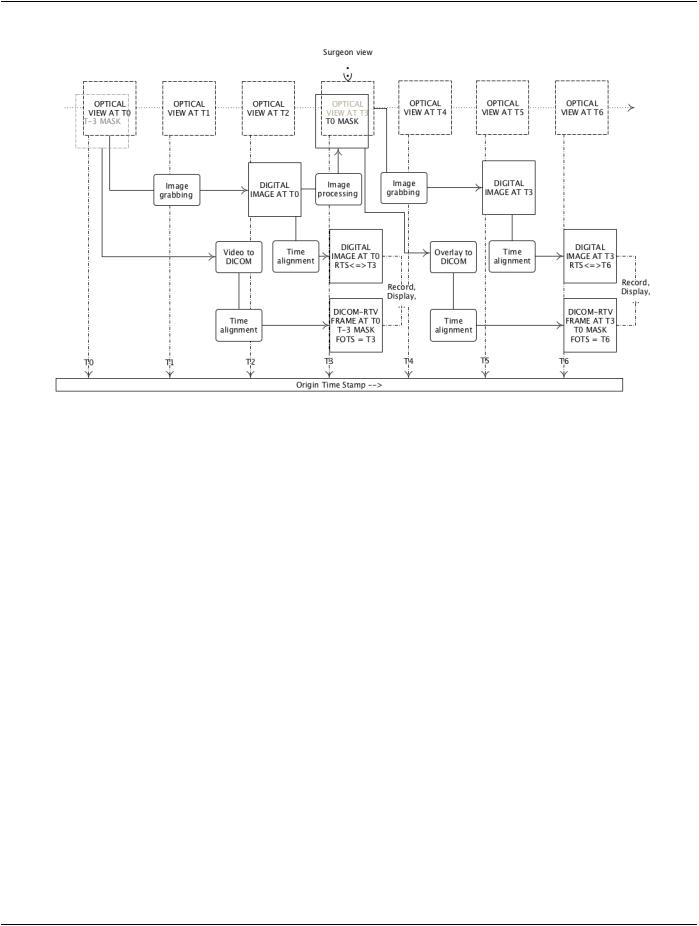
Some solutions consist of a frame grabber in ophthalmology microscopes which grab video frames at 50 / 60 Hz. These frames are​ analyzed to identify the position and orientation of the eye and then a series of graphical objects are superimposed as a graphical​ plane onto the optical path to show the surgeon the best place to perform the incisions and how to orient the new lens to compensate​ the astigmatism.​

Practically,thevideoframegrabbingtakes3framestobeaccessibletotheimageprocessorcomputingtheseriesofgraphicalobjects​ to be drawn as overlays on the optical image. It results in a delay between the frame used to create the objects and the one on which​ these objects are drawn. For safety reasons, it is important to record what the surgeon has seen. Due to the latency of the frame​ grabbing and the calculation of the positions of these graphical objects, the digital images are delayed in memory to also blend these​ objects onto the right digital image for the recording made in parallel.​

DICOM Real-Time Video enables the storage of the recorded video and the frame by frame positions of these graphical objects​ separately. It might also be used to store other values associated with the streams such as the microscope's zoom, focus and light​ intensity values or the phaco's various settings, pressure, in the DICOM-RTV Metadata Flow. These separately stored flows could​ be later mixed together to aid in post-operative analysis or for teaching purposes. It would be possible to re-play the overlay either​ on the later image where the surgeon saw it, or on the image it was calculated from, to improve the algorithm. It would also reduce​ theworkloadofthemachineduringtheoperationbecausetheblendingofthevideotogetherwiththedisplayaidswouldbeperformed​ later during the post-operative analysis phase, and also maintain the original images.​

The RTP Timestamp (RTS) of both video and DICOM-RTV Metadata Flows must match. Frame Origin Timestamp (FOTS) contained​ in DICOM-RTV Metadata must be consistent with RTP Timestamp, enabling the proper synchronization between flows. As shown in​ Figure PPPP.7-2, it is expected that the Frame Origin Timestamp relative of both the digital image and the overlays are set to T6​ when the Image Datetime is T3 and the Referenced Image Datetime of the Mask is T0, represented as the T0 MASK.​

- Standard -​

Page 960​

DICOM PS3.17 2020a - Explanatory Information​

Figure PPPP.7-2. Example of implementation for Augmented reality based on optical image​

Note​

In the case the surgeon is viewing the digital image and not the optical image, the approach could be different, as shown in​ Figure PPPP.7-3.​

- Standard -​

Источник: https://studfile.net/preview/14585770/