Материал: part17

Внимание! Если размещение файла нарушает Ваши авторские права, то обязательно сообщите нам

Page 296​

DICOM PS3.17 2020a - Explanatory Information​

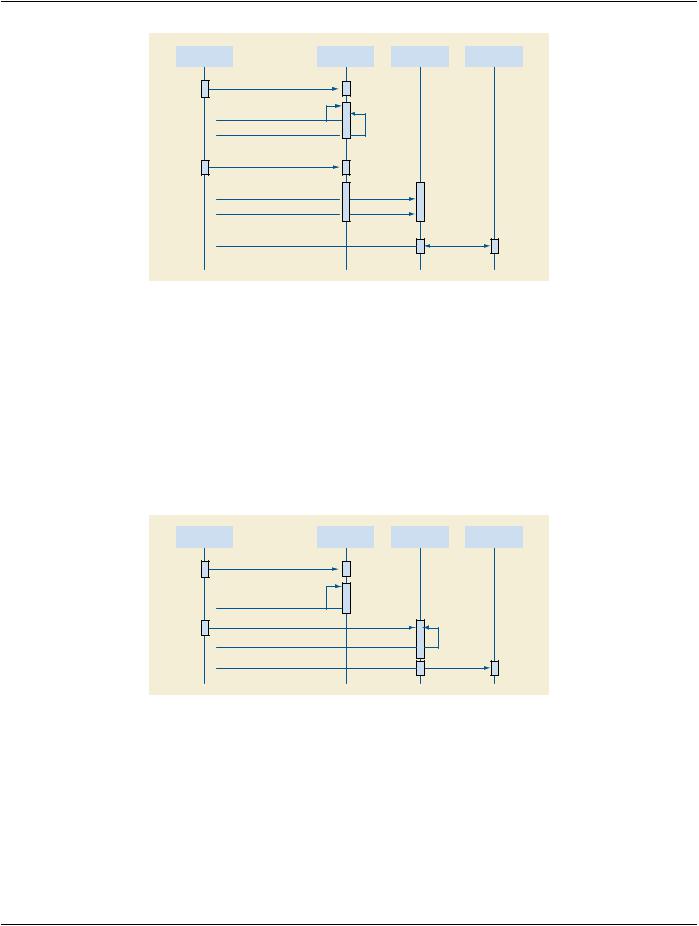
User


Acquisition


Long-term


Display


Modality


Storage


Station


1. Set-up acquisition

2. Perform Acquisition

3. Create Dose Report

4. Verify, Add Comments to Dose Report

5.Send Images

6.Send Dose Report

7. Retrieve Dose Report

Figure AA.3-1. Basic Dose Reporting​

InthisusecasetheusersetsuptheAcquisitionModality,andperformsthestudy.TheModalitycapturestheirradiationeventexposure​ information, and encodes it together with the accumulated values in a Dose Report. The Modality may allow the user to review the​ dose report, and to add comments. The acquired images and Dose Report are sent to a Long-Term Storage system (e.g., PACS)​ that is capable of storing Dose Report objects.​

ADisplayStationmayretrievetheDoseReportfromtheStoragesystem,anddisplayit.BecausetheX-RayRadiationDoseSRobject​ is a proper subset of the Enhanced SR object, the Display Station may render it using the same functionality as used for displaying​ any Enhanced SR object.​

AA.3.2 Dose Reporting For Non-digital Imaging​

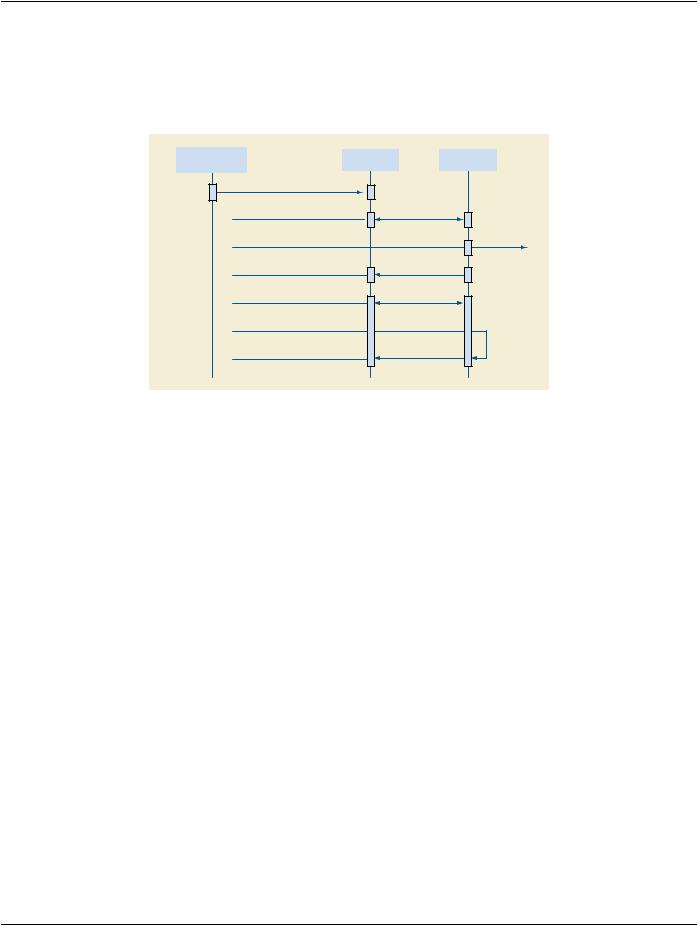
The Dose Report may also be used for image acquisitions using non-digital Acquisition Modalities. See Figure AA.3-2.​

User


Acquisition


Dose Report


Long-Term


Modality


Station


Storage


1. Set-up acquisition

2. Perform Acquisition

3. Enter Dose Information

4. Create Dose Report

5. Send Dose Report

Figure AA.3-2. Dose Reporting for Non-Digital Imaging​

In this use case the user may manually enter the irradiation event exposure information into a Dose Reporting Station, possibly tran-​ scribing it from a dosimeter read-out display. The station encodes the data in a Dose Report and sends it to a Storage system. The​ same Dose Reporting Station may be used to support several acquisition modalities.​

This case may be useful in film-only radiography environments, or in mixed film and digital environments, where the DICOM X-Ray​ Radiation Dose SR Object provides a standard format for recording and storing irradiation events.​

Note that in a non-PACS environment, the Dose Reports may be sent to a Long-Term Storage function built into a Radiation Safety​ workstation or information system.​

- Standard -​

DICOM PS3.17 2020a - Explanatory Information​

Page 297​

AA.3.3 Dose Reporting Post-processing​

AspecializedRadiationSafetyworkstationthemaycontributetotheprocessofdosereportingintermsofmoreelaboratecalculations​ orgraphicaldosedatadisplays,orbyaggregatingdosedataovermultiplestudies.SeeFigureAA.3-3.TheRadiationSafetyworkstation​ may or may not be integrated with the Long-Term Storage function in a single system; such application entity architectural decisions​ are outside the scope of DICOM, but DICOM services and information objects do facilitate a variety of possible architectures.​

Acquisition Modality


Long-Term


Radiation Safety

or


Storage


Station

Dose Report Station


1. Send Dose Report

2. Retrieve Dose Reports

3. Send Regulatory Dose Reports

4. Store Cumulative Dose Report

5.Retrieve Referenced Images

6.Create Dose Map

7.Store Dose Map

Figure AA.3-3. Dose Reporting Post-Processing​

The Radiation Safety workstation may be able to create specific reports to respond to dose registry requirements, as established by​ local regulatory authorities. These reports would generally not be in DICOM format, but would be generated from the data in DICOM​ X-Ray Radiation Dose SR objects.​

The Radiation Safety workstation may also be used to generate more elaborate reports on patient applied dose. The workstation may​ retrieve the Dose Reports for multiple procedures performed on a particular patient. A report of the cumulative dose for a specified​ time period, or for a visit/admission, may be generated, encoded as a DICOM Dose Report, and stored in the Long-Term Storage​ system. Any such further reports will be stored in addition to the "basic report".​

Note that such cumulative Dose Reports may describe irradiation events that are also documented in other Dose Reports. The as-​ signment of a UID to each irradiation event allows the application to identify unique irradiation events that may be reported in multiple​ objects. The structure of the X-Ray Radiation Dose SR object also allows a cumulative report to reference the contributing report​ objects using the Predecessor Documents Sequence (0040,A360) Attribute.​

AnadvancedapplicationmaybeabletousetheDoseReportdata,potentiallysupplementedbythedataintheimageobjectsreferenced​ in the Dose Report, to create a Dose Map that visualizes applied dose. Such a Dose Map may be sent to the Long-Term Storage​ system using an appropriate object format.​

Other purposes of the Radiation Safety workstation may include statistical analyses over all Dose Report Objects in order to gain in-​ formation for educational or quality control purposes. This may include searches for Reports performed in certain time ranges, or with​ specific equipment, or using certain protocols.​

AA.3.4 Dose Reporting Workflow Management​

The dose reporting workflow may be managed using the same DICOM services used for managing the imaging workflow.​

Inparticular,aDoseReportproducedforanAcquisitionModalityPerformedProcedureStepcanbeidentifiedintheMPPSReferenced​

Non-Image Composite SOP Instance Sequence (0040,0220).​

- Standard -​

Page 298​

DICOM PS3.17 2020a - Explanatory Information​

- Standard -​

DICOM PS3.17 2020a - Explanatory Information​

Page 299​

BB Printing (Informative)​

BB.1 Example of Print Management SCU Session (Informative)​

BB.1.1 Simple Example​

This example of a Print Management SCU Session is provided for informational purposes only. It illustrates the use of one of the​ Basic Print Management Meta SOP Classes.​

Example BB.1-1. Simple Example of Print Management SCU Session​

A-ASSOCIATE

N-GET (PRINTER SOP Instance) N-CREATE (Film Session SOP Instance) for (each film of film session)

{

N-CREATE (Film Box SOP Instance) for (each image of film)

{

N-SET (Image Box SOP Instance that encapsulates a PREFORMATTED IMAGE SOP Instance)

}

if (no collation)

{

N-ACTION (PRINT, Film Box SOP Instance)

N-DELETE (Film Box SOP Instance)

}

}

if (collation)

{

N-ACTION (PRINT, Film Session SOP Instance)

N-DELETE (Film Session SOP Instance)

}

N-EVENT-REPORT (PRINTER SOP Instance)

A-RELEASE

- Standard -​

Page 300​

DICOM PS3.17 2020a - Explanatory Information​

BB.1.2 Advanced Example (Retired)​

This section was previously defined in DICOM. It is now retired. See PS3.4-1998.​

- Standard -​

Источник: https://studfile.net/preview/14585770/