Материал: part17

Внимание! Если размещение файла нарушает Ваши авторские права, то обязательно сообщите нам

DICOM PS3.17 2020a - Explanatory Information​

Page 281​

X Dictation-based Reporting With Image​

References (Informative)​

This Annex describes a use of Key Object Selection (KO) and Grayscale Softcopy Presentation State (GSPS) SOP Instances, in​ conjunction with a typical dictation/transcription process for creating an imaging clinical report. The result is a clinical report as a Basic​ Text Structured Report (SR) SOP Instance that includes annotated image references (see Section X.2). This report may also (or al-​ ternatively) be encoded as an HL7 Clinical Document Architecture (CDA) document (see Section X.3).​

Similar but more complex processes that include, for instance, numeric measurements and Enhanced or Comprehensive SR, are​ notaddressedbythisAnnex.ThisAnnexalsodoesnotspecificallyaddressthespecialissuesassociatedwithreportingacrossmultiple​ studies (e.g., the "grouped procedures" case).​

X.1 Basic Data Flows​

X.1.1 Dictation/transcription Reporting​

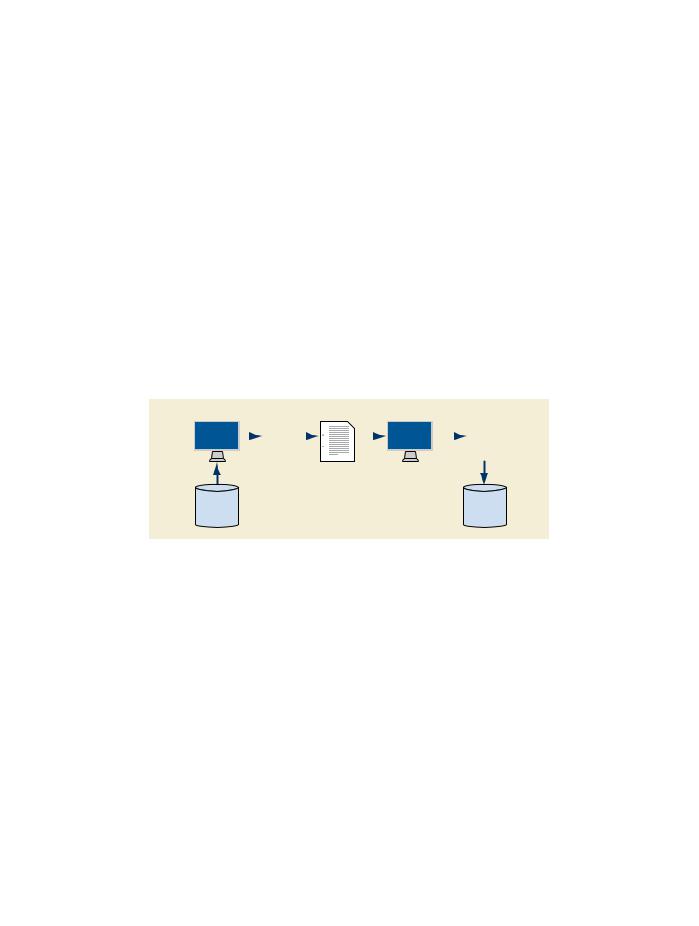
Duringthesoftcopyreadingofanimagingstudy,thephysiciandictatesthereport,whichissenttoatranscriptionserviceorisprocessed​ byavoicerecognitionsystem.Thetranscribeddictationarrivesatthereportmanagementsystem(typicallyaRIS)bysomemechanism​ notspecifiedhere.Thereportmanagementsystemenablesthereportingphysiciantocorrect,verify,and"sign"thetranscribedreport.​ SeeFigureX.1-1.Thisdataflowappliestoreportsstoredinaproprietaryformat,reportsstoredasDICOMBasicTextSRSOPInstances,​ or reports stored as HL7 CDA instances.​

Softcopy Review


Dictation


Transcription

Correction & Signature

Signed Report


Image

Report

Repository

Repository

Figure X.1-1. Dictation/Transcription Reporting Data Flow​

The report management system has flexibility in encoding the report title. For example, it could be any of the following:​

•​the generic title "Diagnostic Imaging Report",​

•​a report title associated with the department (e.g., "Radiology Report"),​

•​a report title associated with the imaging modality or procedure (e.g., "Ultrasound Report"), or​

•​a report title pre-coordinated with the modality and body part (e.g., "CT Chest Report").​

There are LOINC codes associated with each of these types of titles, if a coded title is used on the report (see CID 7000 “Diagnostic​ Imaging Report Document Titles”).​

The transcribed dictation may be either a single text stream, or a series of text sections each with a title. Division of reports into a​ limited number of canonically named sections may be done by the transcriptionist, or automated division of typical free text reports​ may be possible with voice recognition or a natural language processing algorithm.​

Foranelectronicallystoredreport,thesigningfunctionmayormaynotinvolveacryptographicdigitalsignature;anysuchcryptographic​ signature is beyond the scope of this description.​

- Standard -​

Page 282​

DICOM PS3.17 2020a - Explanatory Information​

X.1.2 Reporting With Image References​

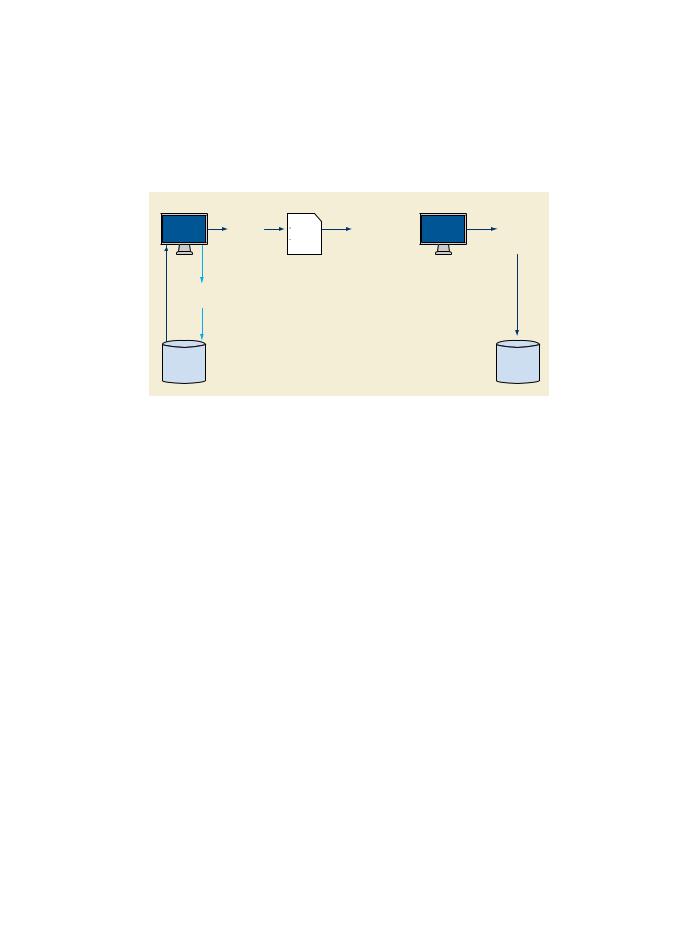
To augment the basic dictation/transcription reporting use case, it is desired to select significant images to be attached (by reference)​ to the report. During the softcopy reading, the physician may select images from those displayed on his workstation (e.g., by a point-​ and-click function through the user interface). The selection of images is conveyed to the image repository (PACS) through a DICOM​ Key Object Selection (KO) document. When the report management system receives the transcribed dictation, it queries the image​ repository for any KO documents, and appends the image references from the KO to the transcription. In this process step, the report​ management system does not need to access the referenced images; it only needs to copy the references into the draft report. The​ correction and signature function potentially allows the physician to retrieve and view the referenced images, correct and change text,​ and to delete individual image references. See Figure X.1-2.​

Softcopy Review

Dictation

Transcription

Create draft report

Correction & Signature

Signed report


with image refs


with image refs

Significant images


Significant images

Significant images


references


references

retrieval


(DICOM Key Object)


(DICOM Key Object)

for verification


Image


Report

Repository


Repository

Figure X.1-2. Reporting Data Flow with Image References​

The transcribed dictation must have associated with it sufficient key Attributes for the report management system to query for the​ appropriate KO documents in the image repository (e.g., Study ID, or Accession Number).​

Each KO document in this process includes a specific title "For Report Attachment", a single optional descriptive text field, plus a list​ ofimagereferencesusingtheSRImageContentItemformat.ThereportmanagementsystemmayneedtoretrieveallKOdocuments​ of the study to find those with this title, since the image repository might not support the object title as a query return key.​

Multiple KO instances may be created for a study report, e.g., to facilitate associating different descriptive text (included in the KO​ document) with different images or image sets. All KOs with the title "For Report Attachment" in the study are to be attached to the​ dictated report by copying their content into the draft report (see Section X.2 and Section X.3). (There may also be KOs with other​ titles, such as "For Teaching", that are not to be attached to the report.)​

The nature of the image reference links will differ depending on the format of the report. A DICOM SR format report will use DICOM​ nativereferences,andotherformatsmayuseahyperlinktothereferencedimagesusingtheWebAccesstoDICOMPersistentObjects​ (WADO) service (see PS3.18).​

X.1.3 Reporting With Annotated Images​

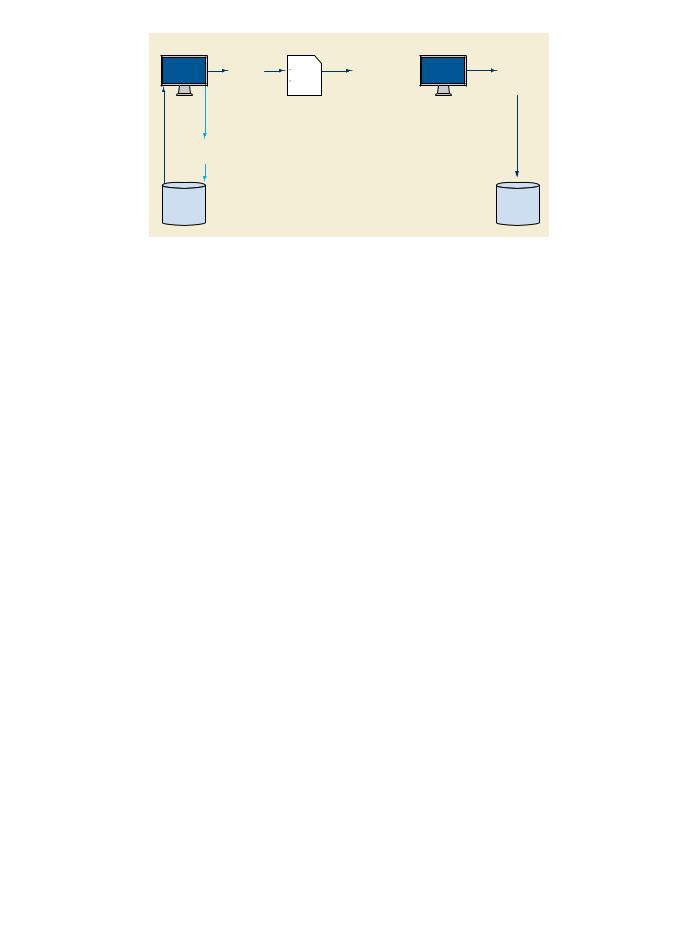
The KO also allows the referencing of a Grayscale Softcopy Presentation State (GSPS) instance for each selected image. A GSPS​ instance can be created by the workstation for annotation ("electronic grease pencil") of the selected image, as well as to set the​ windowwidth/windowlevel,rotation/flip,and/ordisplayareaselectionoftheimageattachedtothereport.ThecreatedGSPSinstances​ are transferred to the image repository (PACS) and are referenced in the KO document.​

As with image references, the report management system may include the GSPS instance references in the report. When the report​ is subsequently displayed, the reader may retrieve the referenced images together with the referenced GSPS, so that the image is​ displayed with the annotations and other GSPS display controls. See Figure X.1-3.​

Note that the GSPS display controls can also be included in WADO hyperlinks and invoked from non-DICOM display stations.​

- Standard -​

DICOM PS3.17 2020a - Explanatory Information​

Page 283​

Softcopy Review

Dictation

Transcription

Create draft report

Correction & Signature

Signed report


with image refs


with image refs

Image


Presentation


(GSPS)


Significant images +

Significant images +


presentation references

presentation retrieval


Significant images +


(DICOM Key Object)

for verification


presentation references


(DICOM Key Object)


Image


Report

Repository


Repository

Figure X.1-3. Reporting Data Flow with Image and Presentation/Annotation References​

X.2 Transcribed Diagnostic Imaging SR Instance Content​

This section describes the use of transcribed dictation and Key Object Selection (KO) instances to produce a DICOM Basic Text SR​ instance. A specific SR Template, TID 2005 “Transcribed Diagnostic Imaging Report”, is defined to support transcribed diagnostic​ imaging reports created using this data flow.​

X.2.1 SR Header Content​

The Attributes of the Patient and Study Modules will be identical to those of the Study being reported. The following information is​ encoded in the SR Document General Module:​

•​Identity of the dictating physician (observer context) in the Author Sequence​

•​Identity of the transcriptionist or transcribing device (voice recognition) in the Participant Sequence​

•​Identity of the report signing physician in the Verifying Observer Sequence​

•​Identity of the institution owning the report in the Custodial Organization Sequence​

•​Linkages to the order and requested procedures in the Referenced Request Sequence​

•​A list of all images in the study in the Current Requested Procedure Evidence Sequence (from MPPS SOP Instances of the Study,​ or from query of the image repository)​

•​A list of all images not in the study, but also attached to the report as referenced significant images, in the Pertinent Other Evidence​ Sequence​

X.2.2 Transcribed Text Data Format​

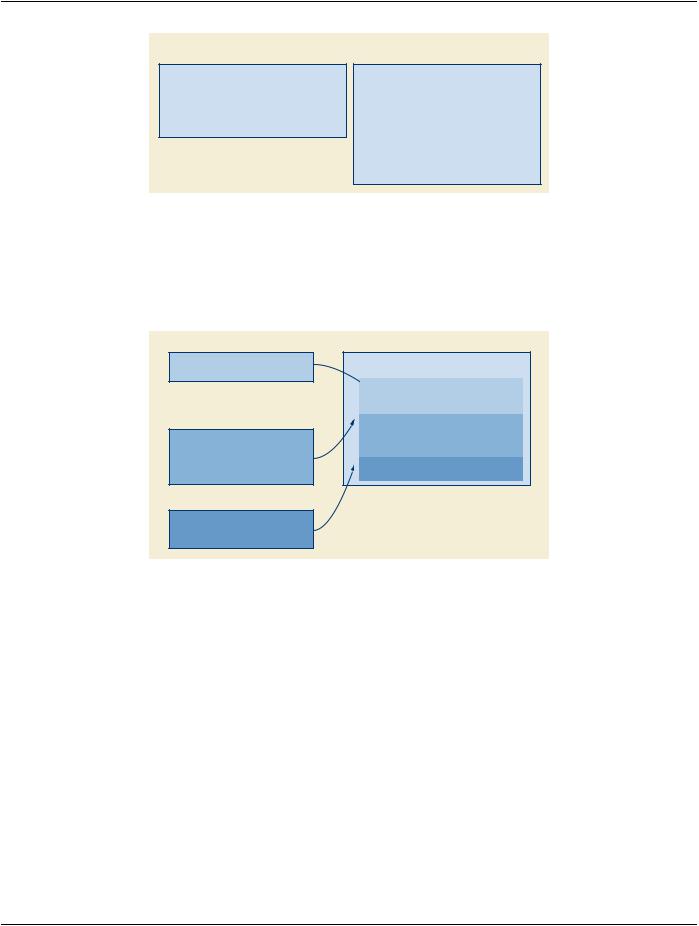
The transcribed dictation is used to populate one or more section containers in the content tree of the SR Instance. If the transcription​ consists of a single undifferentiated text stream, it will typically be encoded using a single CONTAINER content item with Concept​ Name "Findings", and the text encoded as the value in a subsidiary TEXT content item with Concept Name "Finding". When the​ transcription is differentiated into multiple sections with captions, e.g., using the concepts in CID 7001 “Diagnostic Imaging Report​ Headings”, each section may be encoded in a separate CONTAINER, with the concept from CID 7001 “Diagnostic Imaging Report​ Headings” as the container Concept Name, and the corresponding term from CID 7002 “Diagnostic Imaging Report Elements” as the​ Concept Name for a subsidiary TEXT content item. See Figure X.2-1.​

- Standard -​

Page 284​

DICOM PS3.17 2020a - Explanatory Information​

Basic Text SR instance – undifferentiated transcription text stream

Header

CONTAINER “Diagnostic Imaging Report”

CONTAINER “Findings”

TEXT “Finding” “Chest X-ray PA and Lateral.

There is a mass in the left anterior…

Probable malignancy… Refer to

oncology…”

Basic Text SR instance – captioned transcription text stream

Header

CONTAINER “Diagnostic Imaging Report”

CONTAINER “Current Procedure Descriptions”

TEXT “Procedure Description” “Chest X-ray PA

and Lateral”

CONTAINER “Findings”

TEXT “Finding” “There is a mass in the left

anterior…”

CONTAINER “Conclusions”

TEXT “Conclusion” “Probable malignancy…”

CONTAINER “Recommendations”

TEXT “Recommendation” “Refer to oncology…”

Figure X.2-1. Transcribed Text Content Tree​

X.2.3 Image Reference Format​

ThecontentitemsfromeachassociatedKOobjectwillbeincludedintheSRinaseparateCONTAINERwithConceptName(121180,​ DCM, "Key Images"). The text item "Key Object Description" and all image reference items shall be copied from the KO content tree​ to the corresponding SR container. See Figure X.2-2.​

Transcription test (undifferentiated)

“Chest X-ray PA and Lateral. There is a mass in the left anterior… Probable malignancy… Refer to oncology…”

KO Instance 1

Header

CONTAINER “For Report Attachment” TEXT ”Key Object Description” “Best

illustration of findings” IMAGE <reference 1>

IMAGE <reference 2> <GSPS ref>

KO Instance 2

Header

CONTAINER “For Report Attachment”

IMAGE <reference 3>

IMAGE <reference 4>

Basic Text SR instance

Header

CONTAINER “Diagnostic Imaging Report” CONTAINER “Findings”

TEXT “Finding” “Chest X-ray PA and Lateral. There is a mass in the left anterior… Probable malignancy…Refer to oncology…”

CONTAINER “Key Images”

TEXT ”Key Object Description” “Best illustration of findings”

IMAGE <reference 1>

IMAGE <reference 2> <GSPS ref> CONTAINER “Key Images”

IMAGE <reference 3> IMAGE <reference 4>

Figure X.2-2. Inputs to SR Basic Text Object Content Tree​

The KO and SR IMAGE content item format allows the encoding of an icon (image thumbnail) with the image reference, as well as​ a reference to a GSPS instance controlling image presentation. Whether or not to include icons or GSPS references is an implement-​ ation decision of the softcopy review station that creates the KO; the IMAGE content item as a whole may be simply copied by the​ report management system from the KO to the Basic Text SR instance.​

The intended process is that all KOs "For Report Attachment" are to be automatically included in the draft report. Therefore, the cor-​ rection and signature function of the report management system should allow the physician to delete image references that were in-​ cluded, perhaps unintentionally, by the automatic process.​

X.3 Transcribed Diagnostic Imaging CDA Instance Content​

ThissectiondescribestheuseoftranscribeddictationandKeyObjectSelection(KO)documentstoproduceanHL7ClinicalDocument​ Architecture (CDA) Release 2 document.​

Note​

While this section describes encoding as CDA Release 2, notes are provided about encoding issues for CDA Release 1.​

- Standard -​

DICOM PS3.17 2020a - Explanatory Information​

Page 285​

X.3.1 CDA Header Content​

The header of the CDA instance includes:​

•​Identity of the patient ("recordTarget" participation)​

•​Identity of the requested procedure ("documentationOf" act relationship)​

•​Identity of the dictating physician ("author" participation)​

•​Identity of the transcriptionist ("dataEnterer" participation)​

•​Identity of the report signing physician ("legalAuthenticator" participation)​

•​Identity of the institution owning the report ("custodian" participation)​

•​Identity of the request/order ("inFulfillmentOf" act relationship)​

Note​

The markup components in CDA Release 1 use different names.​

X.3.2 Transcribed Text Content​

Each transcription section can be encoded in a Section in the CDA document. The Section.Code and/or Section.Title can be derived​ from the corresponding transcription section title, if any. Although the transcription text can be encoded in the Section.Text without​ further markup, it is recommended that it be enclosed in <paragraph> tags.​

X.3.3 Image References​

Images are referenced using hypertext links in the narrative text. These links in CDA are not considered part of the attested content.​

Note​

1.​The primary use case for this Annex is the dictation/transcription reporting model. In the historical context of that model,​ the images (film sheets) are usually not considered part of the attested content of the report, although they are part of​ the complete exam record. I.e., the report is clinically complete without the images, and the referenced images are not​ formally part of the report. Therefore, this Annex discusses only the use of image references, not images embedded in​ the report.​

2.​Being part of the attested content would require the images to be displayed every time the report is displayed - i.e., they​ are integral to understanding the report. If the images are attested, they must also be encapsulated with the CDA​ package. I.e., the CDA document itself is only one part of the interchanged package; the referenced images must also​ always be sent with the CDA document. If the images are for reference only and not attested, the Image Content Item​ may be transformed to a simple hypertext link; it is then the responsibility of CDA document receiver to follow or not​ follow the hyperlink. Moreover, as the industry moves toward ubiquitous network access to a distributed electronic​ healthcare record, there will be less need to prepackage the referenced images with the report.​

In the current use case, there will be one or more KO instances with image references. Each KO instance can be transformed to a​ Section in the CDA document with a Section.Title "Key Images", and a Section.Code of 121180 from the DICOM Controlled Termin-​ ology (see PS3.16). If the KO includes a TEXT content item, it can be transformed to <paragraph> data in that Section.Text of the​ CDA document. Each IMAGE content item can be transformed to a link item using the <linkHtml> markup.​

Within the <linkHtml> markup, the value of the href Attribute is the DICOM object reference as a Web Access to Persistent DICOM​ Objects (WADO) specified URI (see Table X.3-1).​

Note​

1.​When a DICOM object reference is included in an HL7 CDA document, it is presumed the recipient would not be a​ DICOM application; it would have access only to general Internet network protocols (and not the DICOM upper layer​ protocol), and would not be configured with the means to display a native DICOM image. Therefore, the recommended​ encodingofaDICOMObjectReferenceintheCDAnarrativeblock<linkHtml>usesWADOforaccessbytheHTTP/HTTPS​

- Standard -​

Источник: https://studfile.net/preview/14585770/